Jobin.cloud Feature

Tracking

Having a large pool of prospects is pointless without proper organization.
Organize, Tag, and Rank Prospects for a Streamlined Workflow.

Key features

All-in-One Prospecting Workflow

Supported by AI

Tag your prospects, add notes, and move them through pipelines that match how your business works.

Create unlimited pipelines, each tailored to its own process: recruiting, sales, or anything else.
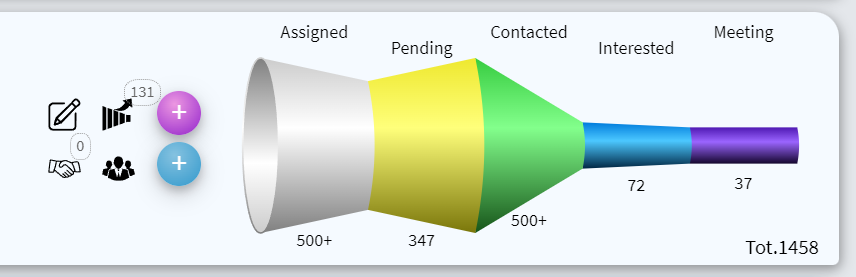
  • Custom Pipelines screenshot

    Custom Pipelines

    • Unlimited, fully customizable stages
    • Sub-stages and exit stages
    • Drag-and-drop management
    • Visual funnel of every candidate or lead
    See how it works (Custom Pipelines)
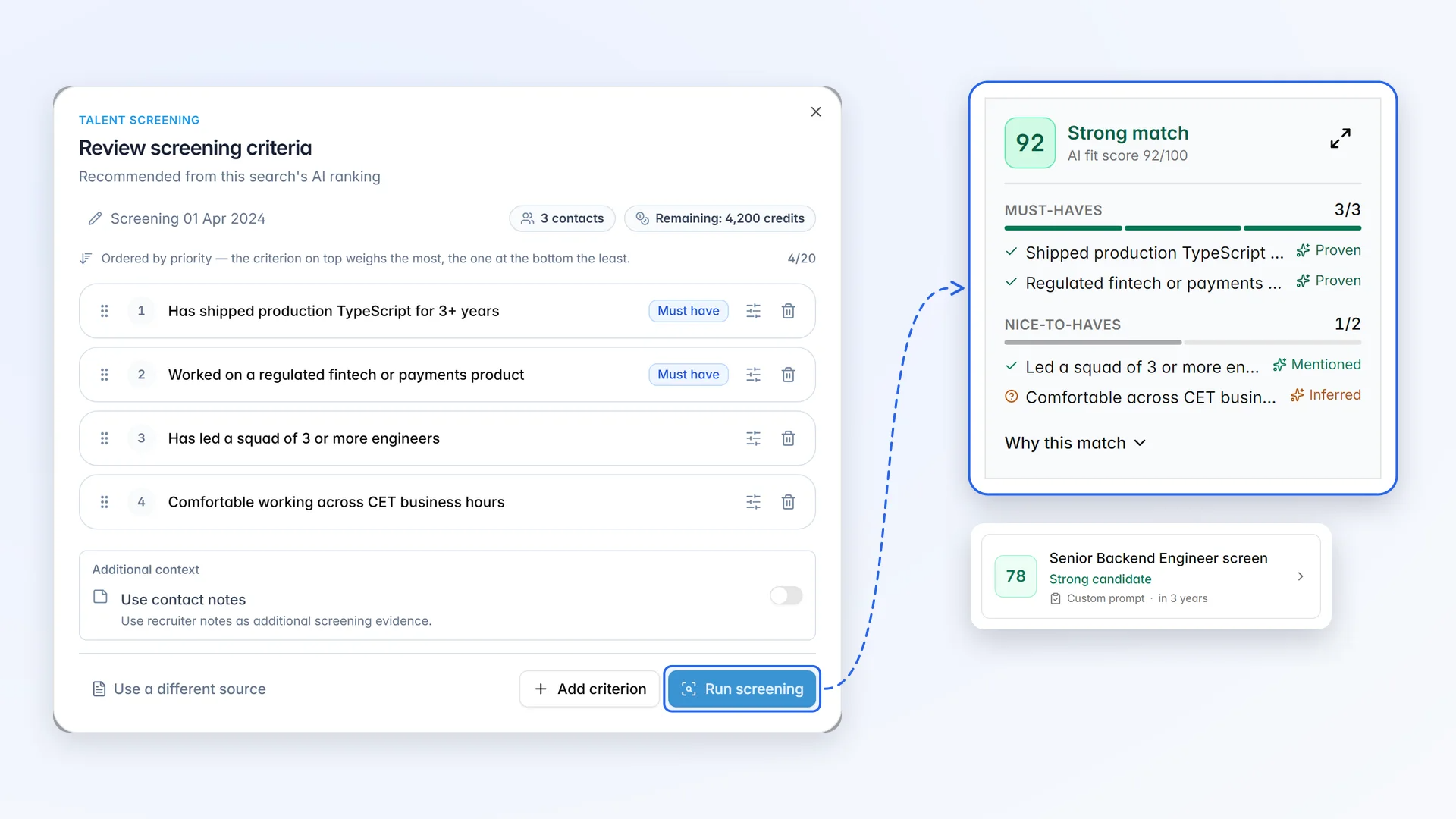
  • Screening and Ranking screenshot

    Screening and Ranking

    • Ideal candidate profile
    • Fit index for every contact
    • Automatic ranking
    • Advanced filtering

    AI sets the ideal profile, scores each fit and generates filters

    See how it works (Screening and Ranking)
  • Interaction Timeline and Monitoring screenshot

    Interaction Timeline and Monitoring

    • Smart inbox collects every message
    • Full interaction history for each lead
    • Auto-sync with LinkedIn connections and InMails
    • Operations monitor and reporting

    AI sorts replies as positive, negative or custom

    See how it works (Interaction Timeline and Monitoring)

Fully customizable Recruiting workflow

Visual controls for funneling candidates

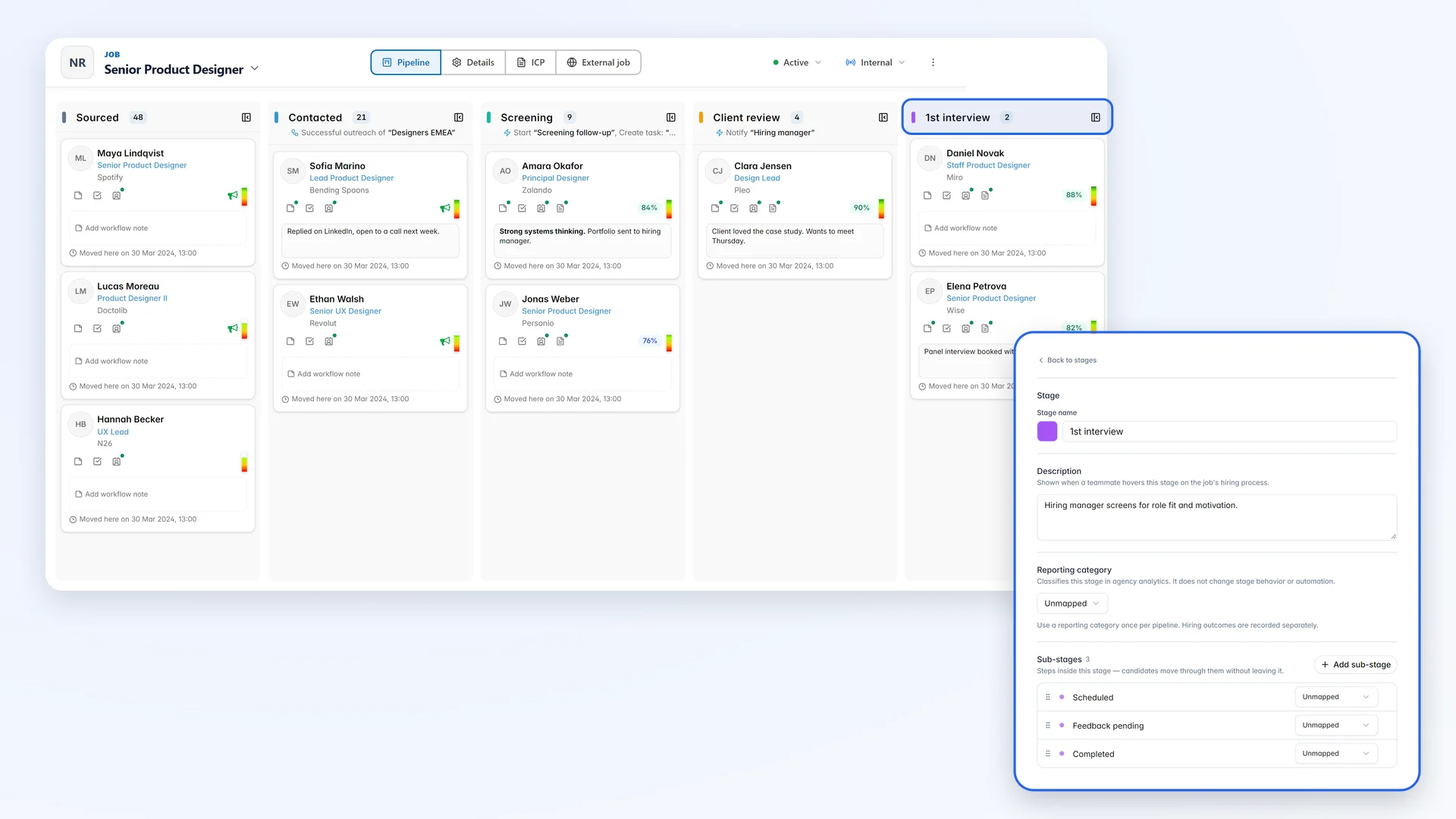
Easily move your candidates along your recruiting workflow either in bulk through selections or just by drag-and-dropping.


Set up your ideal workflow according to your needs with:

  • Unlimited numbers of stages
  • Customizable stage names, color and description
  • Alterable stage positions by drag and dropping
  • Customizable stage sub-stages
  • Customizable exit stages


On top of visual funnel overviews and kanban stage displays, everything can be saved into a template and filtered by stage, and sub-stages as well. You can also assign a dedicated contact ranking template for the workflow's "ideal candidate" to save time and have it automatically filter for you each time the pipeline is selected.
Fully customizable Recruiting workflow

Interaction timeline

Monitor messaging campaigns

Monitor any interaction you've taken with a specific contact, or a full activity board of everything set-up in a neat chronologically ordered timeline, from messaging and emailing to pipeline assignments.


It's hard to keep track of all your emailing and messaging campaigns on your own, let alone when working with a team. Jobin helps remind both you and your workgroup of
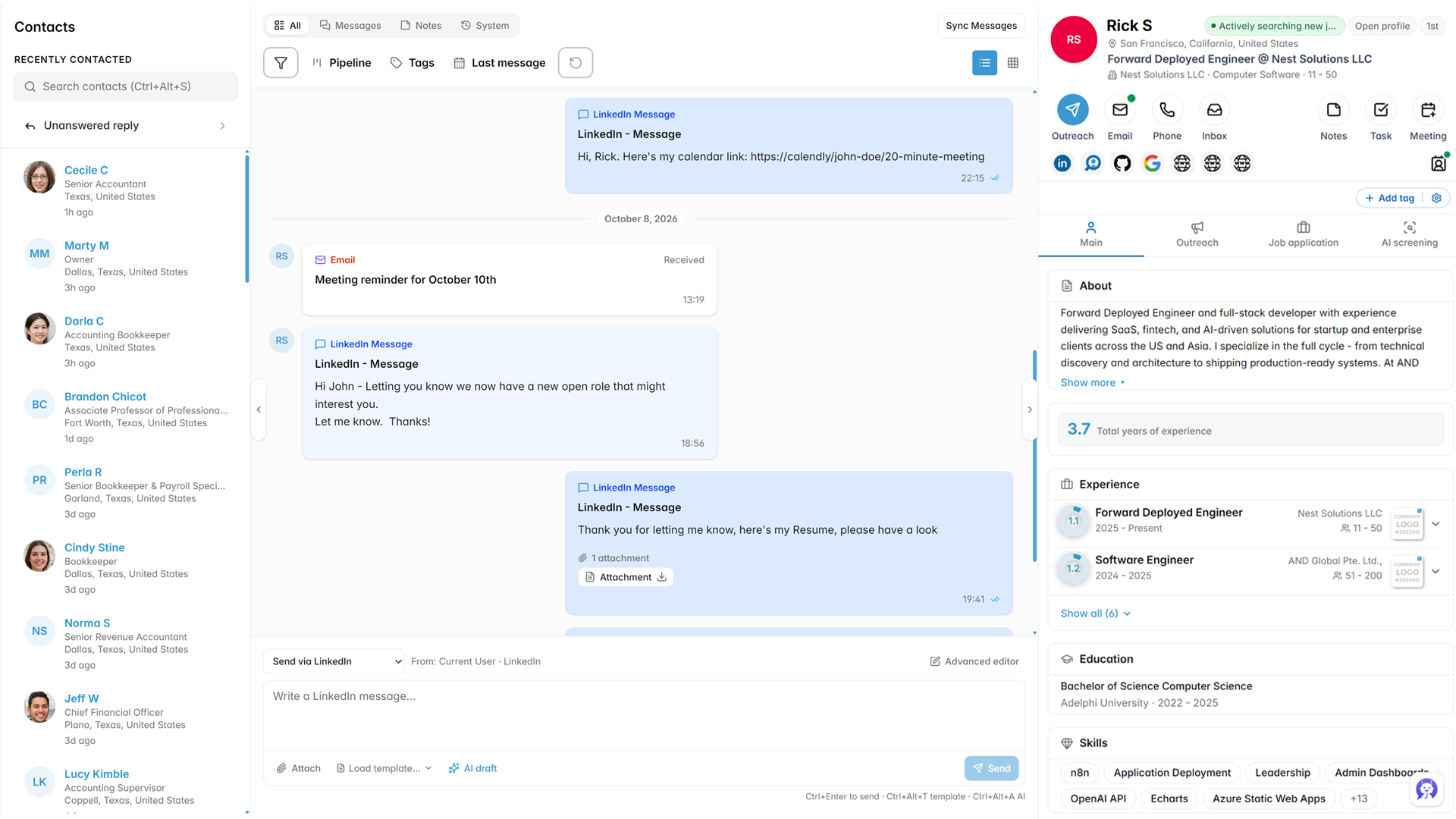
  • what happened (email, invite, pipeline movement etc.)
  • when it happened
  • who was involved


Effectively allowing entire teams to efficiently work on large emailing campaigns in perfect harmony.

Interaction timeline

Ideal Candidate and Profile matching

Weighted must-have, exclude, and nice-to-have filters

Recruiters strive to quickly find top candidates.
Having filtering systems pre-scan massive datasets is essential to reduce time-to-hire and efficiently find the best candidates for the job.


Jobin supports you in that, accommodating not only traditional boolean searches but also advanced ranking systems that create a "fitting index" of each contact, providing a fully ordered contact list, from most fitting to least fitting.

Jobin.cloud filters have 3 commands:

  • Must have criteria (green)
  • Excluded criteria (red)
  • Optional criteria (light-blue)

Role, company, and industry criteria can match a contact's current job, past jobs, or both.

Optional criteria aren't mandatory and therefore allow you to rank your contacts, granting enhanced filter flexibility thanks to
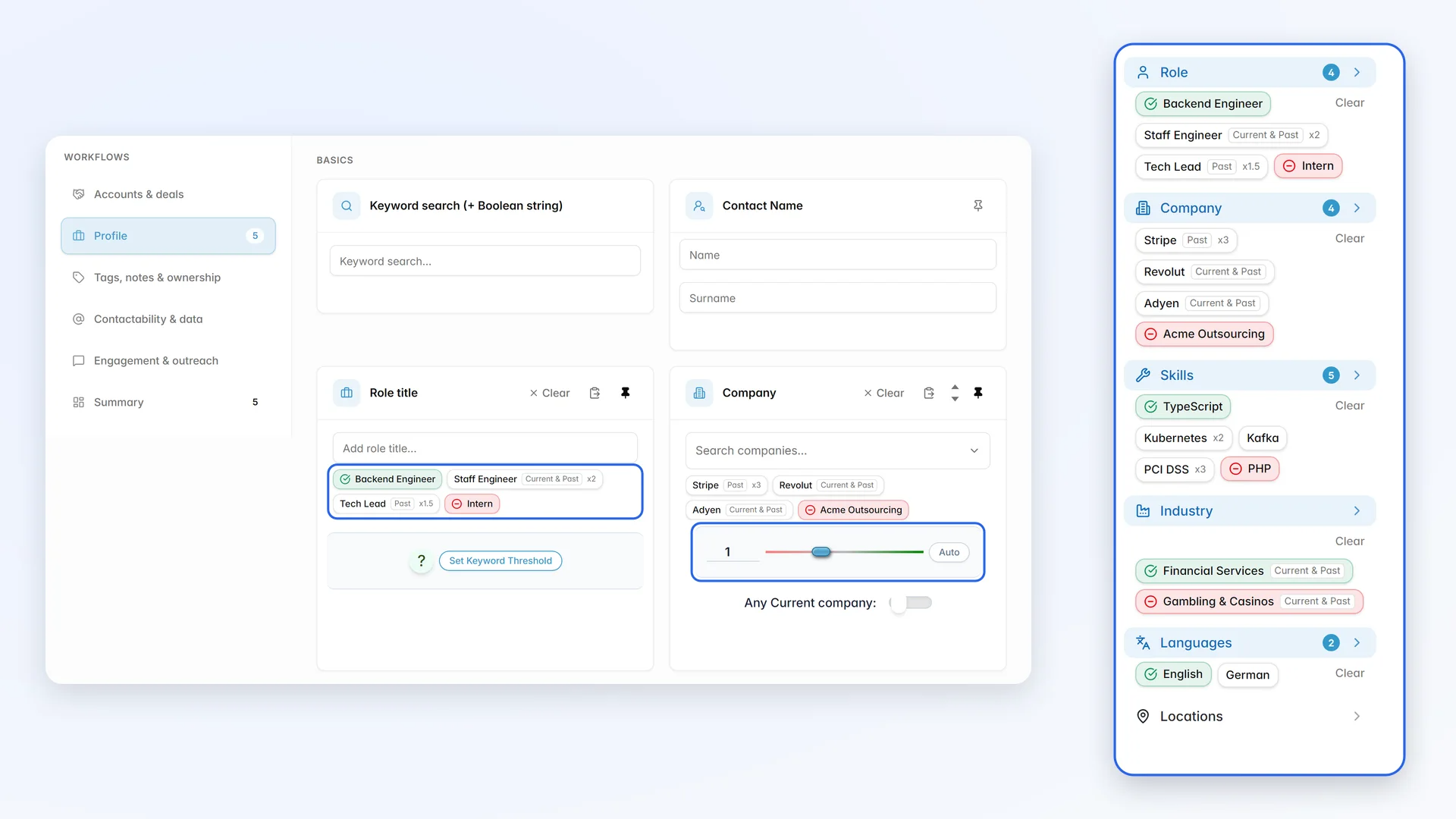
  • Score multipliers ranging from 0.1 to 5
    customize the relevancy of each keyword
  • Minimum Optional keyword threshold
    make your searches broad and keep them relevant at the same time


Each filter can be saved into templates and can be synchronized into a job-spec to automatically apply itself when searching for candidates. On top of fitting index filters, you can apply simple boolean filters as well.

Ideal Candidate and Profile matching

On-demand AI screening

Let AI check what a filter can't

Some requirements never appear as a clean keyword: a hard-to-find specialism, a culture fit, or a concept described in a dozen different ways. Instead of reading every profile by hand, have AI screen them for you.

  • Screen any group of candidates: a selection, a filtered segment, a tag, a shortlist, or a whole job pipeline
  • Generate up to 20 criteria from a prompt, a job description, or an existing job, then set each one as a must-have or a nice-to-have, with categories such as culture fit, soft skills, or technical skills
  • Get an AI fit score for every candidate, with each criterion marked as proven, mentioned, inferred, or missing
  • Keep working while it runs, then review the results in Contacts alongside your usual filters


Each candidate keeps their AI screening report on their profile, so the reasoning behind a score is always one click away. Move the best matches straight into the job's pipeline or into outreach.

On-demand AI screening

Geographic Search

Radius search and auto-compiled fields

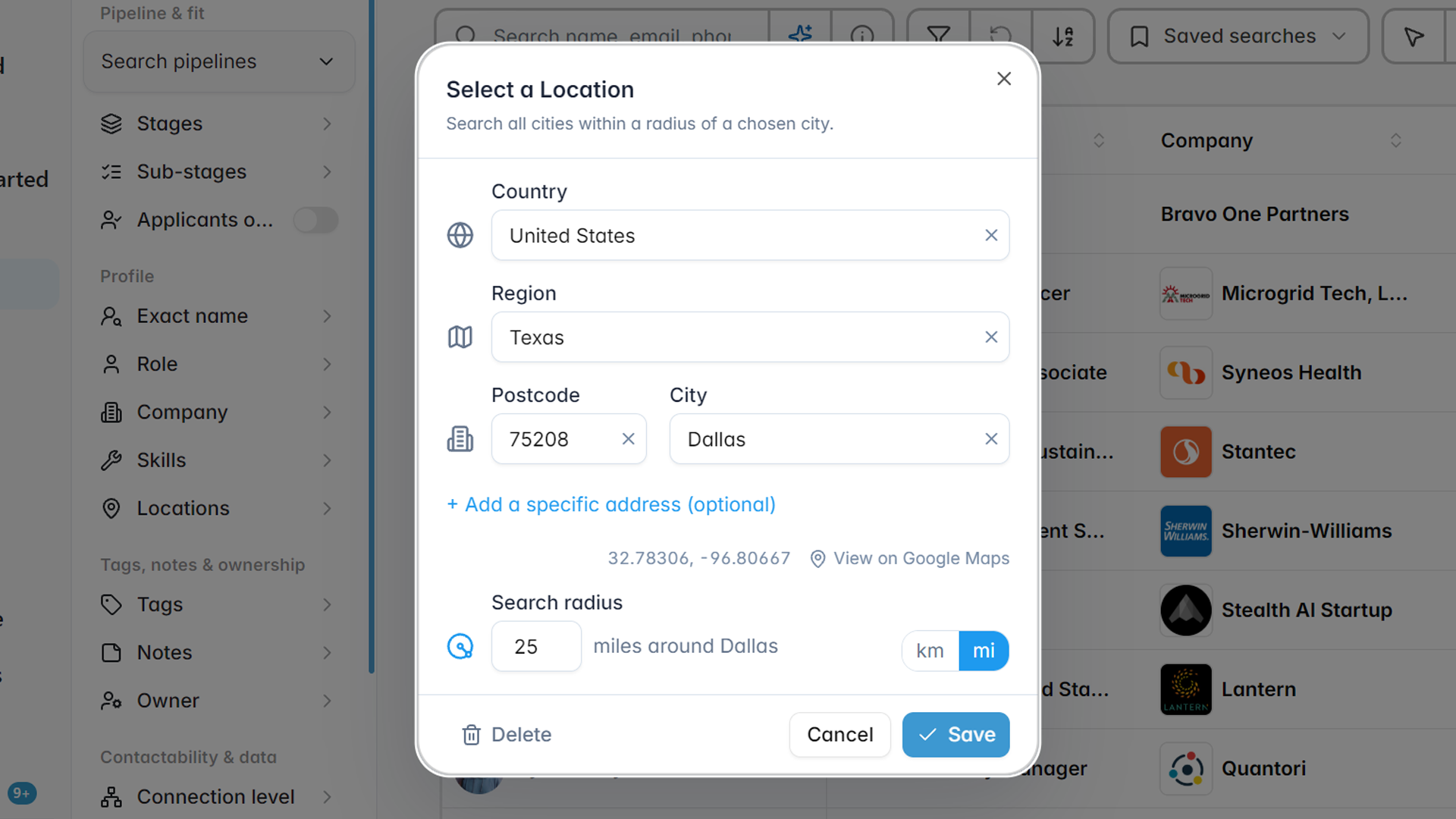
Profiles containing names of minor towns, suburbs and villages are very difficult to find with conventional location filters, and typing out long lists of names just to search in larger geographic areas is rarely worth the effort.


Jobin allows you to define a central location (a City) and a radius in miles (or km) around it, so only 1 name is necessary to include any amount of towns around it. Furthermore, if given the chance, Jobin will:

  • Auto-compile Countries
  • Auto-compile Postcodes
  • Auto-compile Regions


Allowing for easy filtering of pre-defined areas.
Geographic Search

Database sharing and structured teamwork

WorkGroups management

Organize your business activities and your team in dedicated workGroups with independent data content, participant members, logos, etc. Available to all users, no need to be a large corporation.


The trend shows that Recruiting is focusing more and more on single niches, independent and relatively small groups of experts. This is valid both in Recruiting Agencies and within HR departments in many Companies. Jobin supports this reality with a structured system of multiple workGroups each with
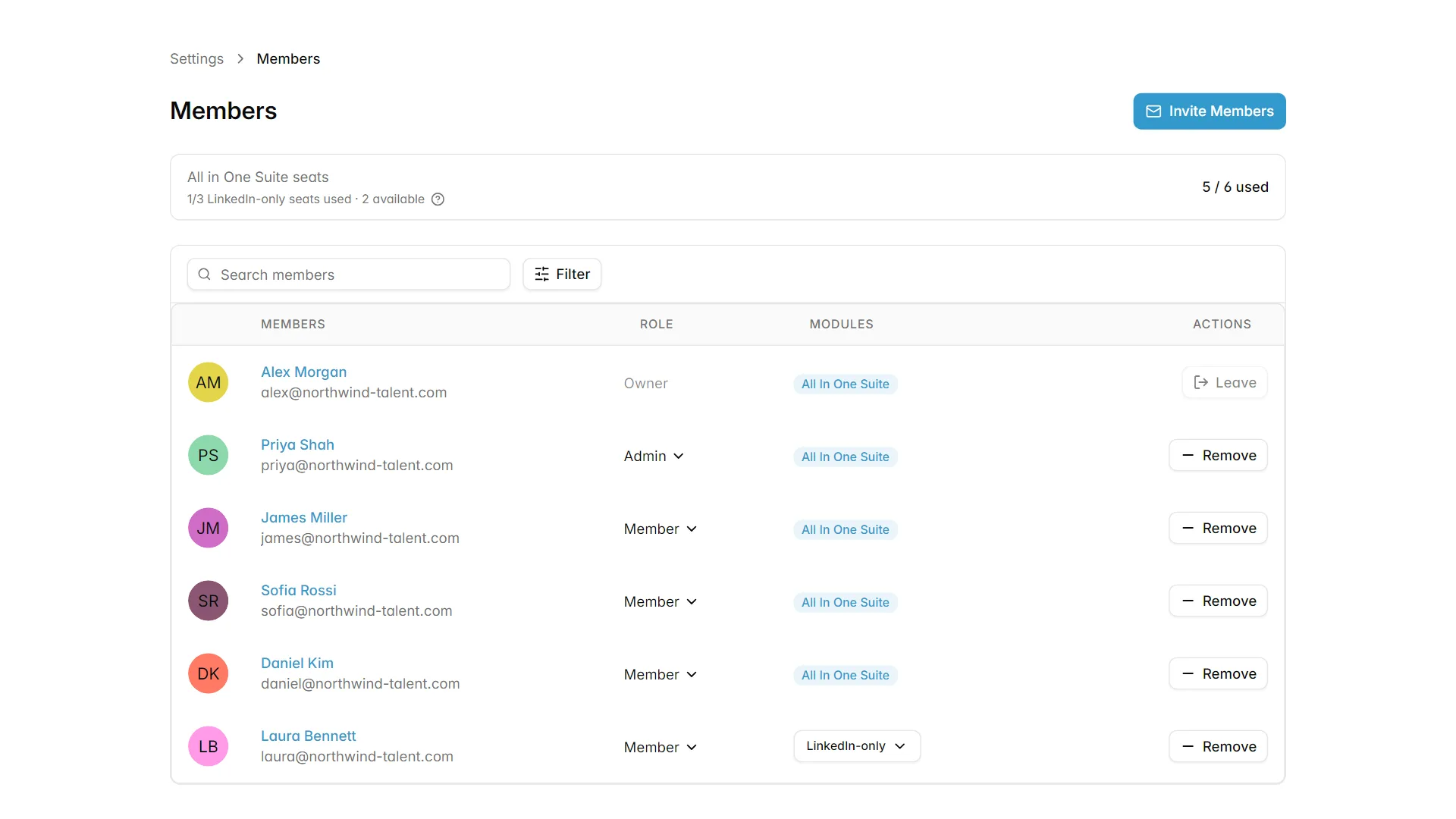
  • separate datasets
  • real-time data sharing between members
  • events timeline of each member's activities
Database sharing and structured teamwork

Automatic Profile updating

Data must be kept alive and updated to provide value!

Having tens of thousands of Contacts, but never knowing whether any of them are actually hire-ready or not can get very time consuming and is no doubt a very frustrating experience for every recruiter.


Jobin can help get your database back in good shape with the press of a single button

  • Automatic profile updating
    never again work with outdated obsolete data
  • mass emailing
    get your answers directly from the candidates themselves!

LinkedIn activity control

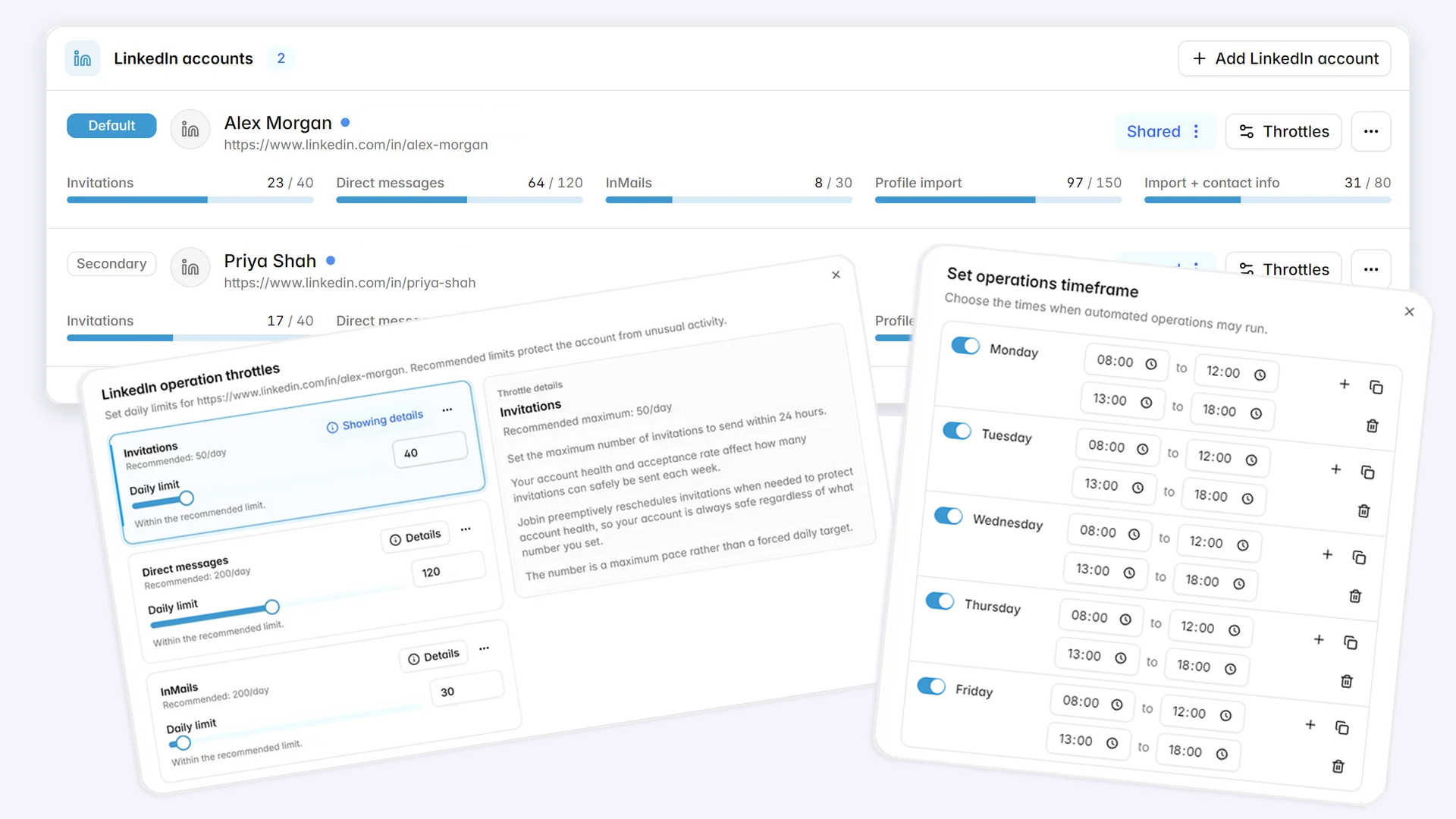
Protect your LinkedIn account from excessive activity

Having too many connection requests remain ignored is a red flag for LinkedIn to mark you as a spam account


The Jobin monitoring and maintaining systems can, for example (with your consent) automatically withdraw your pending and not accepted invitations, either by:

  • withdrawing invitations older than a set period
  • withdrawing a set amount of your last invitations


Before they reach the LinkedIn 3,000 limit, but ideally, you should keep the number as low as possible at all times.
When it comes to profile visits you can avoid the issue altogether.


The Jobin Extension imports LinkedIn search-result in Full (not just name and role) without triggering a LinkedIn Profile visit.


Without a way for LinkedIn to track you, there's no restriction on how many you import, and you can then freely view them all in your Jobin repository.

LinkedIn activity control

Your LinkedIn network at a glance

Track connections and clean up pending invitations

The Jobin Dashboard shows how your LinkedIn network is growing, next to your outreach activity and response rates.


For each connected LinkedIn account you can see:

  • total connections and new connections
  • pending invitations
  • received invitations
  • connection requests sent, accepted, and replied to


From the same card, import all your 1st connections into Jobin, or withdraw pending invitations in bulk: all of them, those sent before a date, or the oldest ones first.
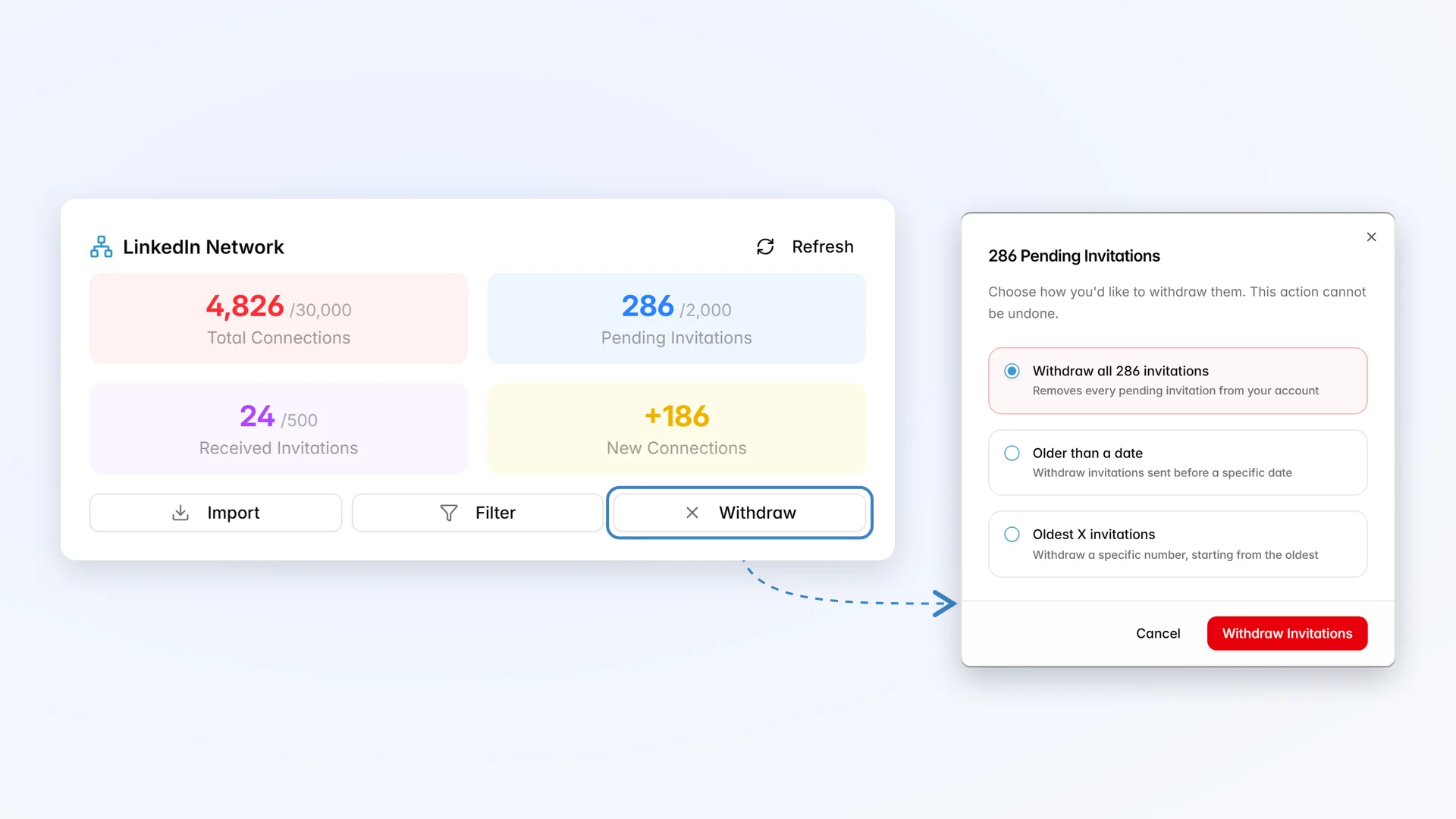
Your LinkedIn network at a glance

Client Portal and candidate scorecards

Share shortlists with clients and collect structured feedback

Give each client a secure view of their job's pipeline, so feedback arrives inside Jobin instead of scattered across emails and spreadsheets.
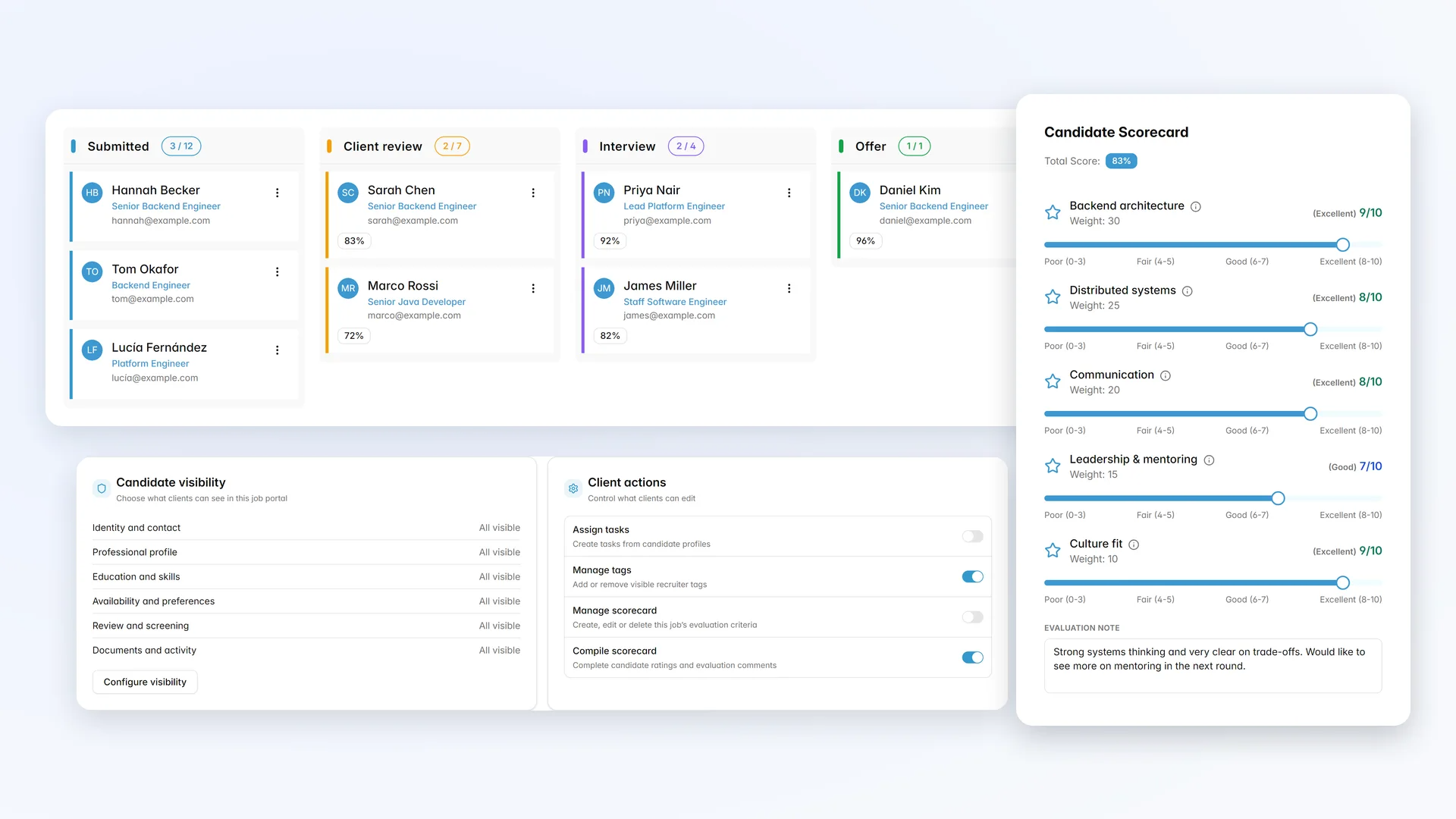
  • Share a job pipeline with client users
  • Collect weighted scorecards so every candidate is judged on the same criteria
  • Control exactly which candidate details and notes each client can see, and keep names anonymous until you are ready
  • Let clients approve or reject candidates, and on the jobs you choose, drag candidates between stages themselves
  • Export candidate evaluations as PDF, Excel, or PowerPoint reports
Client Portal and candidate scorecards

Career page, applications, and job boards

Publish jobs and collect applications in one place

Create a job with AI, then publish it where candidates will find it.

  • A branded career page for your open jobs
  • Job-specific application questions, saved straight to reusable custom fields
  • Post to job boards and social channels through the Broadbean integration
  • Bulk CV and resume parsing for the applications you receive


Every application lands in the job pipeline, ready to screen and rank against the ideal candidate.
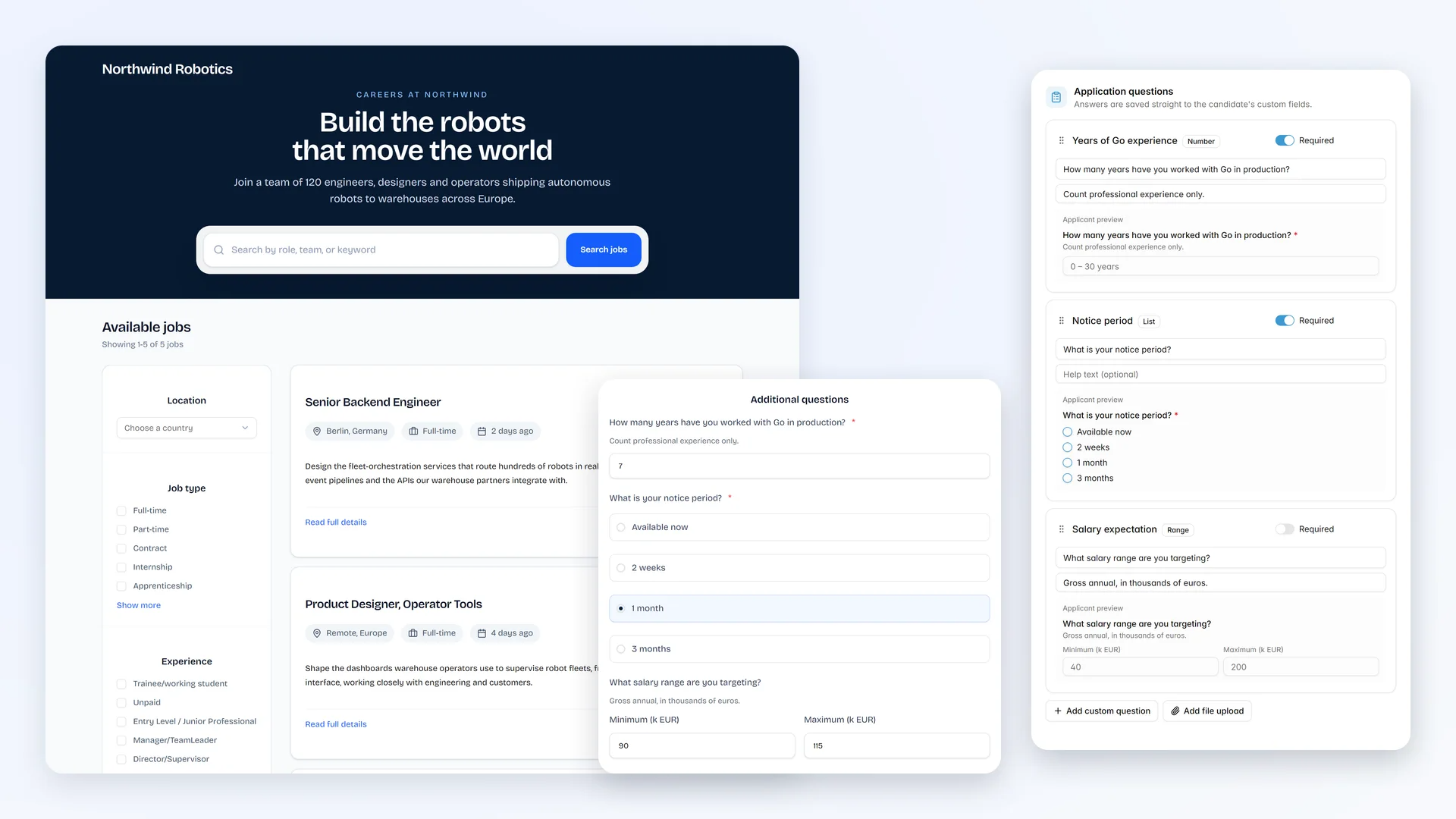
Career page, applications, and job boards

Client companies and accounts

A dedicated CRM workspace for your clients

Keep every client company in one record: its contacts, open jobs, notes, documents, and activity.

  • List, card, and split views with saved searches
  • Import companies from a CSV file, with a smart link parser for websites
  • One tag workspace for contacts, accounts, and jobs

Easily filter and shortlist your desired accounts and run targeted outreach campaigns on the linked contact persons or employees on any custom selected list of saved accounts.
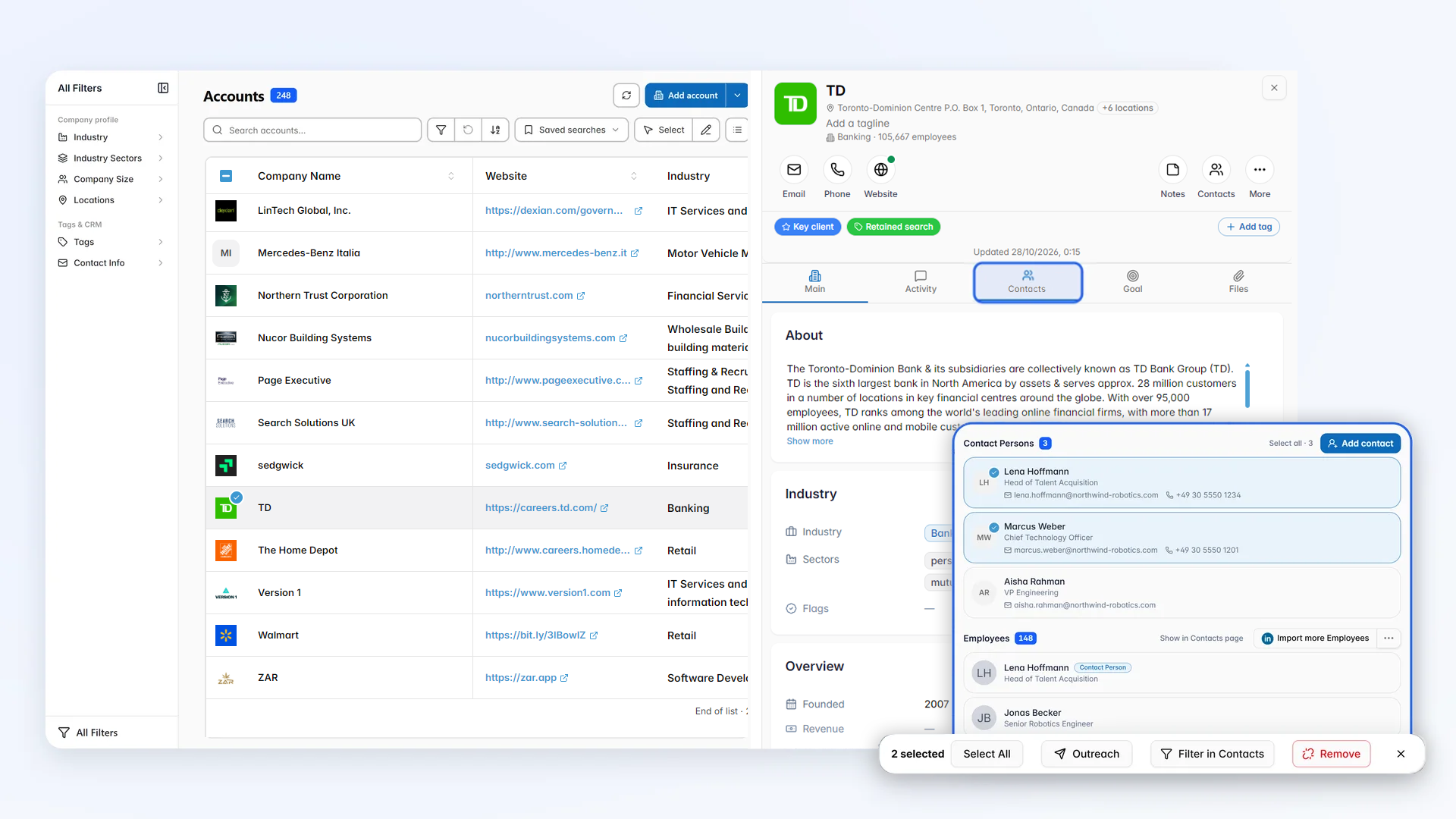
Client companies and accounts

Deals, sales pipelines, and MPC marketing

Win more clients with a pipeline built for agencies

Track every client opportunity on a sales pipeline board, from the first conversation to the signed agreement.
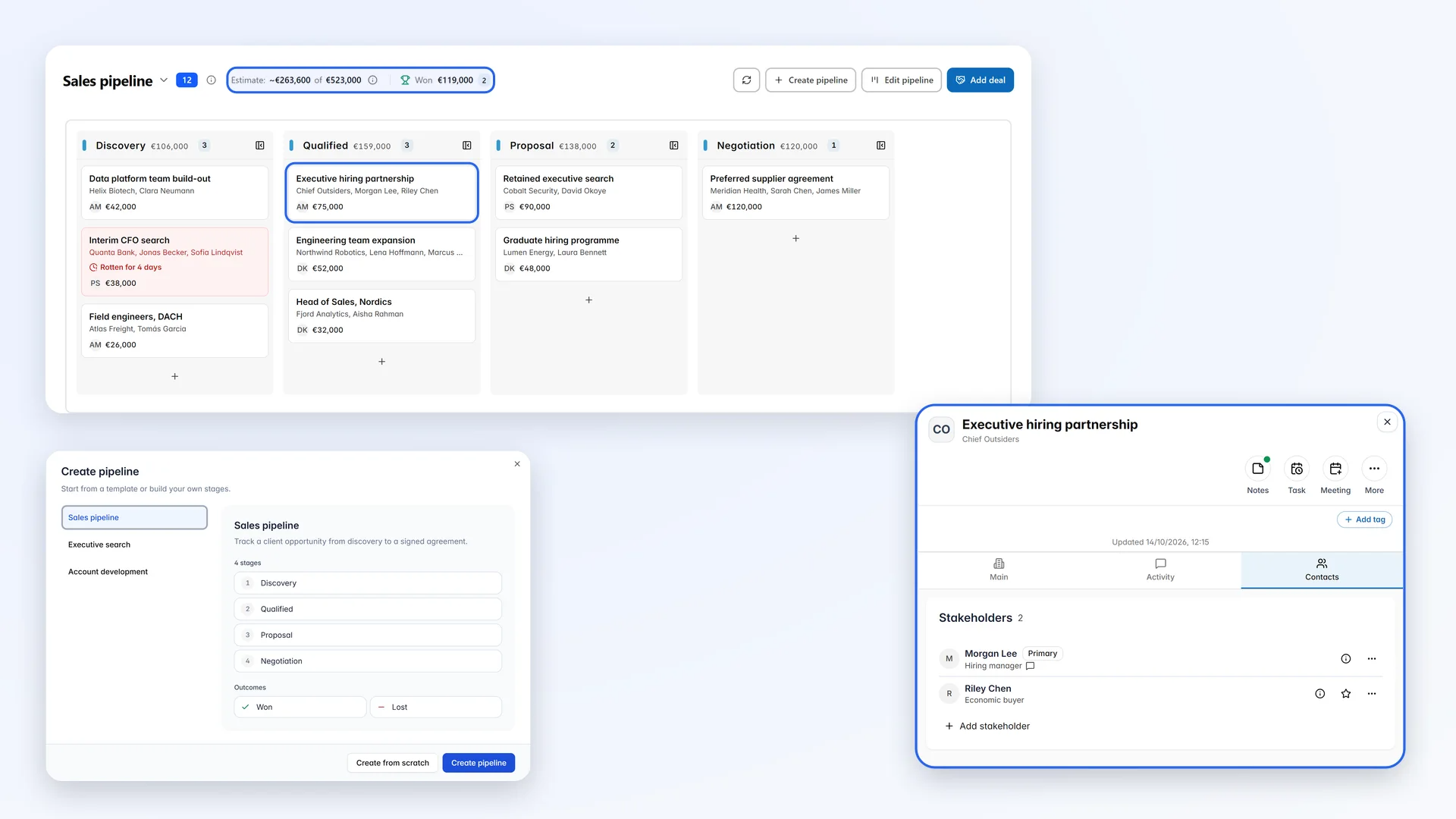
  • Start from a recruitment template: Lean, Consultative, Enterprise, or MPC, then adjust the stages and win probabilities
  • A weighted forecast of your open pipeline, and alerts when a deal has gone quiet for too long
  • Stakeholders with their roles, notes, tasks, and client meetings on every deal
  • Create deals for a whole list of client contacts or accounts in one step
  • Market your most placeable candidates (MPCs) to target companies, with each deal valued from the candidate’s salary and your fee


An MPC deal pitches one standout candidate to one company, so the same candidate can be marketed to several companies, each tracked on its own. The candidate stays a candidate, and the expected value is calculated from their desired salary and a fee percentage you can change for every deal.


Mark deals won or lost with a reason, then turn a won deal into a job so recruiting starts from the agreed terms. Business development reports show your win rate, loss reasons, and pipeline value.

Deals, sales pipelines, and MPC marketing

Tasks, task queues, and calendar

Never let a follow-up slip

Create to-do and call tasks for any contact or job, group them into custom queues, and work through each queue one contact at a time.
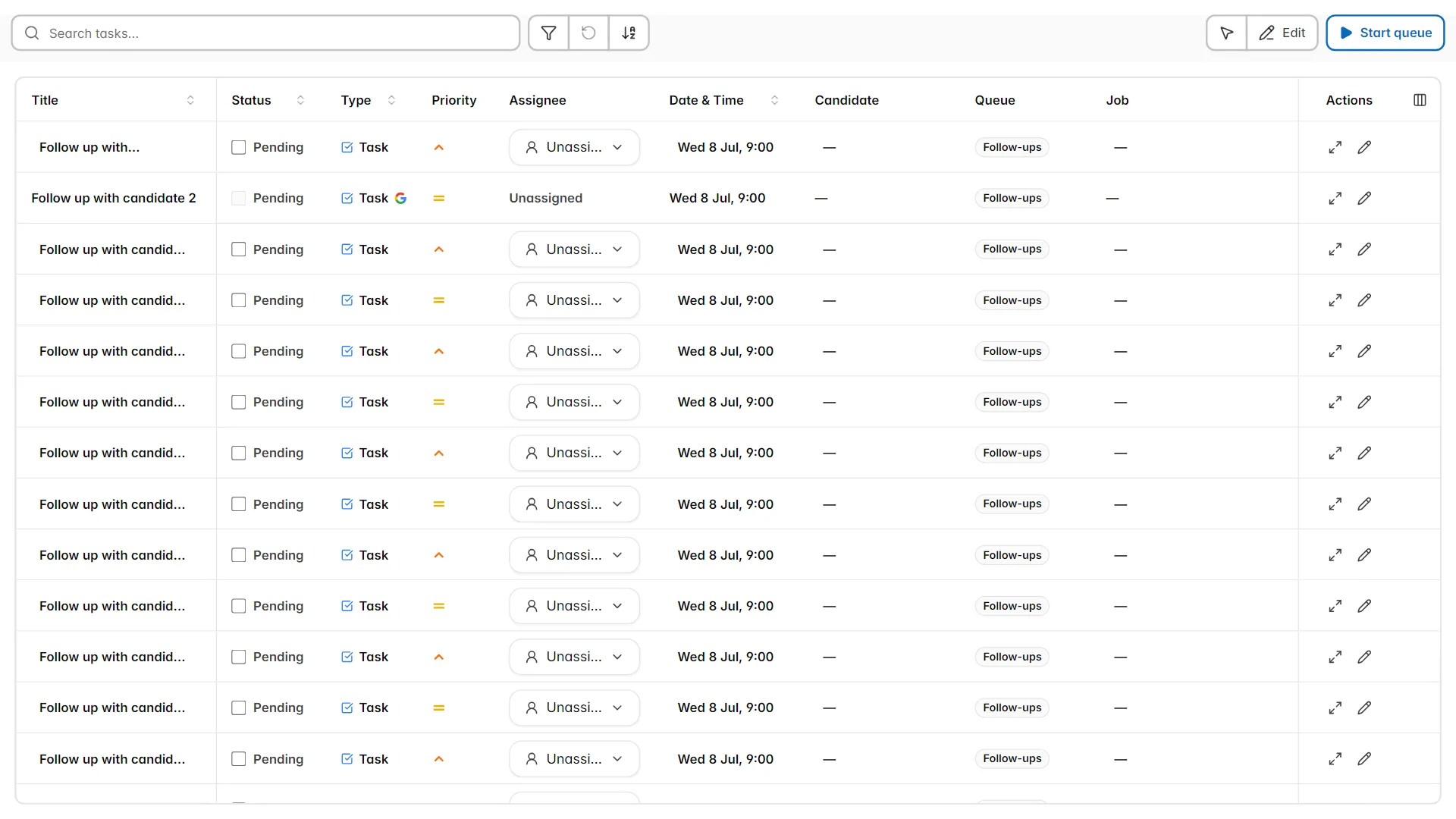
  • Command center, planner, week, and month views
  • Connect Google or Outlook calendars and see your meetings next to your tasks
  • Schedule candidate meetings with availability checked across your calendars
  • See pending tasks as soon as you open a contact
  • Assign a personalized task to up to 1,000 contacts at once, in a temporary call list that clears itself when you are done
  • A countdown to the next task on every contact, job, account, and deal
Tasks, task queues, and calendar

AI meeting notetaker

Turn every interview into notes, tasks, and CRM updates

Jobin's AI notetaker joins your Google Meet, Zoom, and Microsoft Teams meetings, records them, and writes the notes for you.
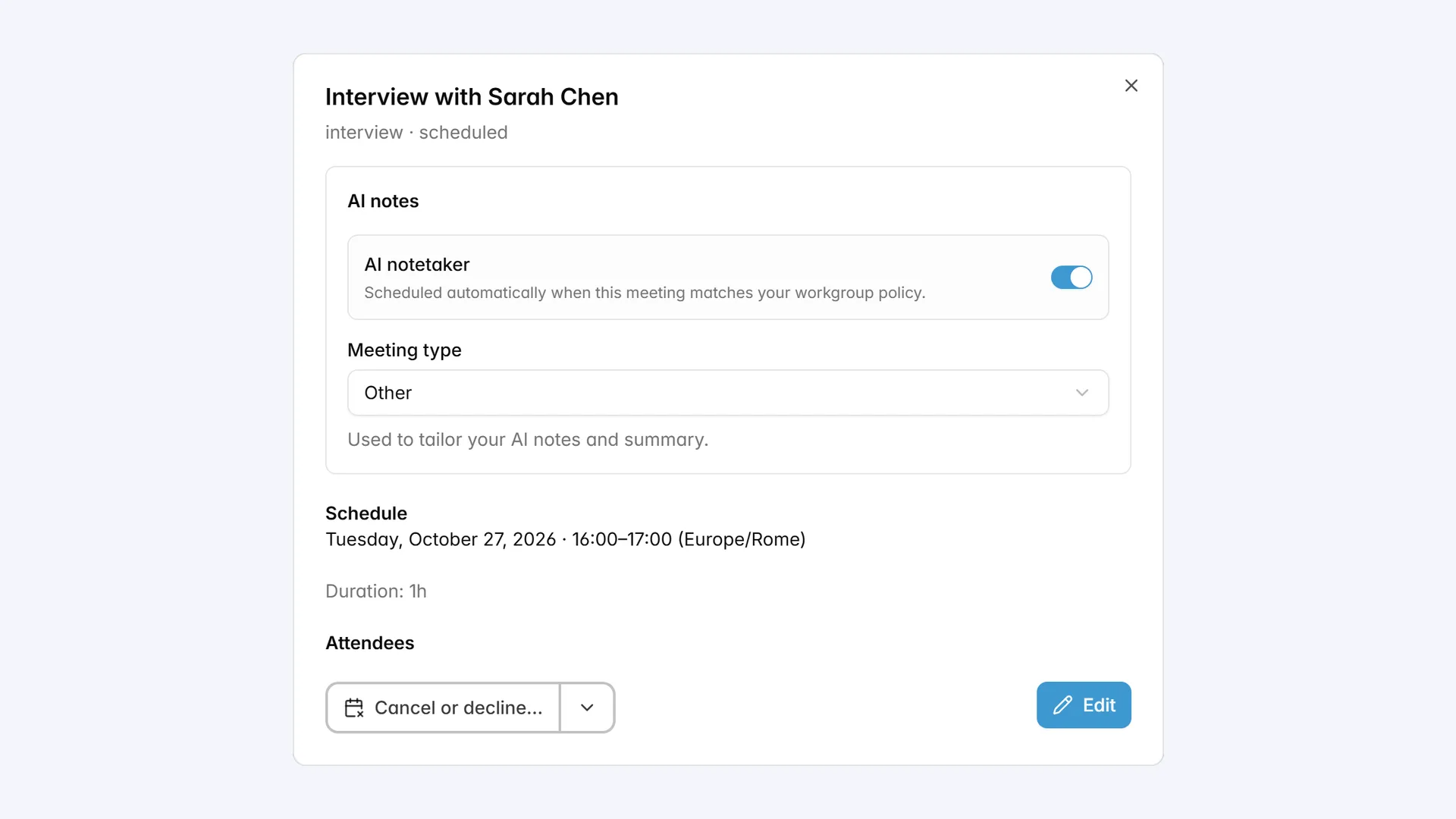
  • Notes tailored to the meeting type: candidate screening, interview, client intake, client update, or business development
  • A searchable transcript, with the evidence behind every point
  • Suggested follow-up tasks, profile updates, and job criteria to accept in one click
  • Ask a question about the meeting and get an answer from its transcript
  • An AI meeting brief before the call, with talking points, attendee profiles, and your shared preparation notes


For panel interviews, assign feedback to your interviewers and collect a structured recommendation from each of them.


Admins decide whether meetings are captured automatically and which email domains or keywords the notetaker must never join.

AI meeting notetaker

Recruiting, revenue, and client reports

Know what your desk is really producing

Ready-made reports answer the questions agencies ask every week.

  • Recruiting performance: submissions, offers, placements, falloffs, and time to hire
  • Jobs, team, and candidate source comparisons
  • Revenue and invoices, business development opportunities, and client outcomes
  • Contract staffing: active contractors, billings, margin, and utilization


Build your own reports with calculated metrics, share them with your team, and track goals on a leaderboard.
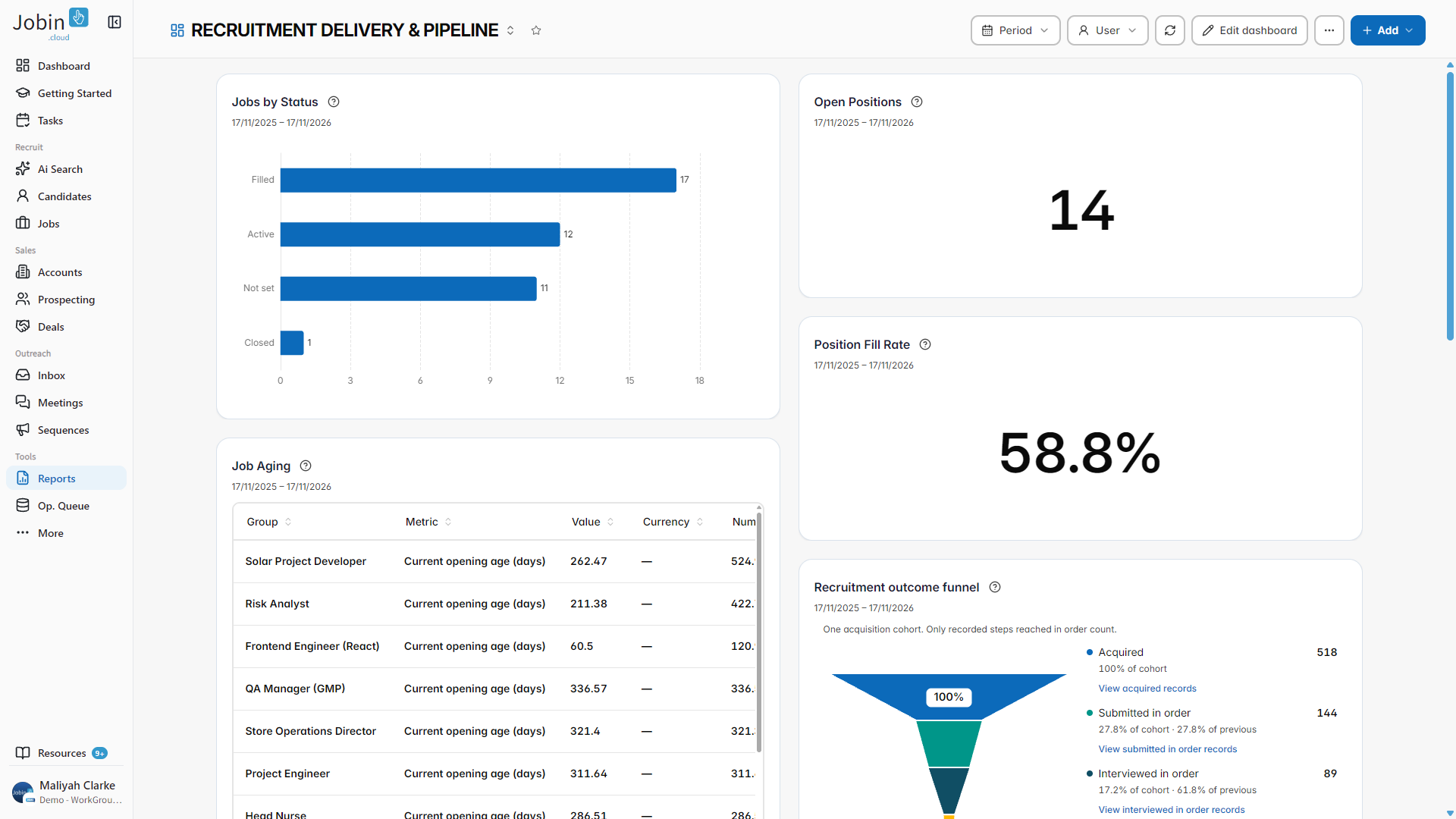

Placements and Invoices keep the back office in the same place: every hire with its client, job, start dates, and booked fee, draft invoices prepared from confirmed placements, and payments tracked through to the last partial payment.

Recruiting, revenue, and client reports

Proof points

  • ATS and recruiting CRM in one workspace

    Contacts, client accounts, jobs, pipelines, and every interaction live in the same records.

  • Clients review candidates inside Jobin.cloud

    The Client Portal shares job pipelines with clients and collects weighted scorecards, with recruiters controlling what clients see.

  • Meetings that update the CRM

    The AI notetaker records Google Meet, Zoom, and Microsoft Teams meetings and suggests follow-up tasks and profile updates.

ATS and CRM pricing

ATS and recruiting CRM pricing is available as a focused module, with the All-in-One suite on the main pricing page.

View pricing

Positioning

Compared with a standalone ATS

Jobin.cloud connects the hiring pipeline to sourcing, enrichment, and multi-channel outreach instead of tracking candidates in isolation.

Compared with spreadsheets and email threads

Pipelines, client feedback, tasks, meeting notes, and reports stay structured, searchable, and shared with the team.

FAQs

Is Jobin.cloud an ATS or a CRM?

Both. Jobin.cloud combines a candidate and client CRM with ATS pipelines, a career page, job board posting, and a Client Portal.

Does Jobin.cloud record meetings?

Yes. The AI notetaker records Google Meet, Zoom, and Microsoft Teams meetings and produces transcripts, AI notes, and suggested tasks.

What reports does Jobin.cloud include?

Recruiting performance, jobs, team, sources, outreach, revenue and invoices, business development, clients, and a custom report builder with goals.

Can Jobin.cloud track client deals and business development?

Yes. Deals track client opportunities on a sales pipeline with win probabilities, a weighted forecast, inactivity alerts, and loss reasons, and a won deal can be turned into a job.

Does Jobin.cloud track placements and invoices?

Yes. Placements record each hire with its client, job, start dates, and booked fee, and Invoices track drafts, sending, partial payments, and credits, with a full change history.

What is the difference between ranking filters and AI screening?

Ranking filters use must-have, excluded, and weighted nice-to-have criteria to instantly rank your whole database by what a profile states. On-demand AI screening reads each profile in a chosen group to judge what a filter cannot, such as hard-to-find requirements or culture fit, and gives every candidate a fit score with evidence.

Browse the full product FAQ

See contact workflow views in practice

For a practical walkthrough of configurable contact views, engagement history, activity timelines, custom fields, and Kanban pipeline work, read our guide to contact management views and engagement analytics.

Jobin.cloud

contact record

AI Sourcing

Email/Phone Finder

AI Screening

Multi Outreach

Unified Inbox

Pipeline

Ready to experience it firsthand?

Less busywork.More results.

Bring sourcing, outreach and contact management together in Jobin.

Free to start, live in minutes.