Jobin.cloud Feature

Outreach

Multi-channel messaging via Emails or any type of LinkedIn messages with AI support.

Key features

Personalize Messages at Scale and Automate

Supported by AI

Spend your time on real conversations and let Jobin run the operations. Fine-tune your audience, find their contact details, and personalize each message around the person's role, interests and skills.

Boost the response rate of your messaging campaigns.
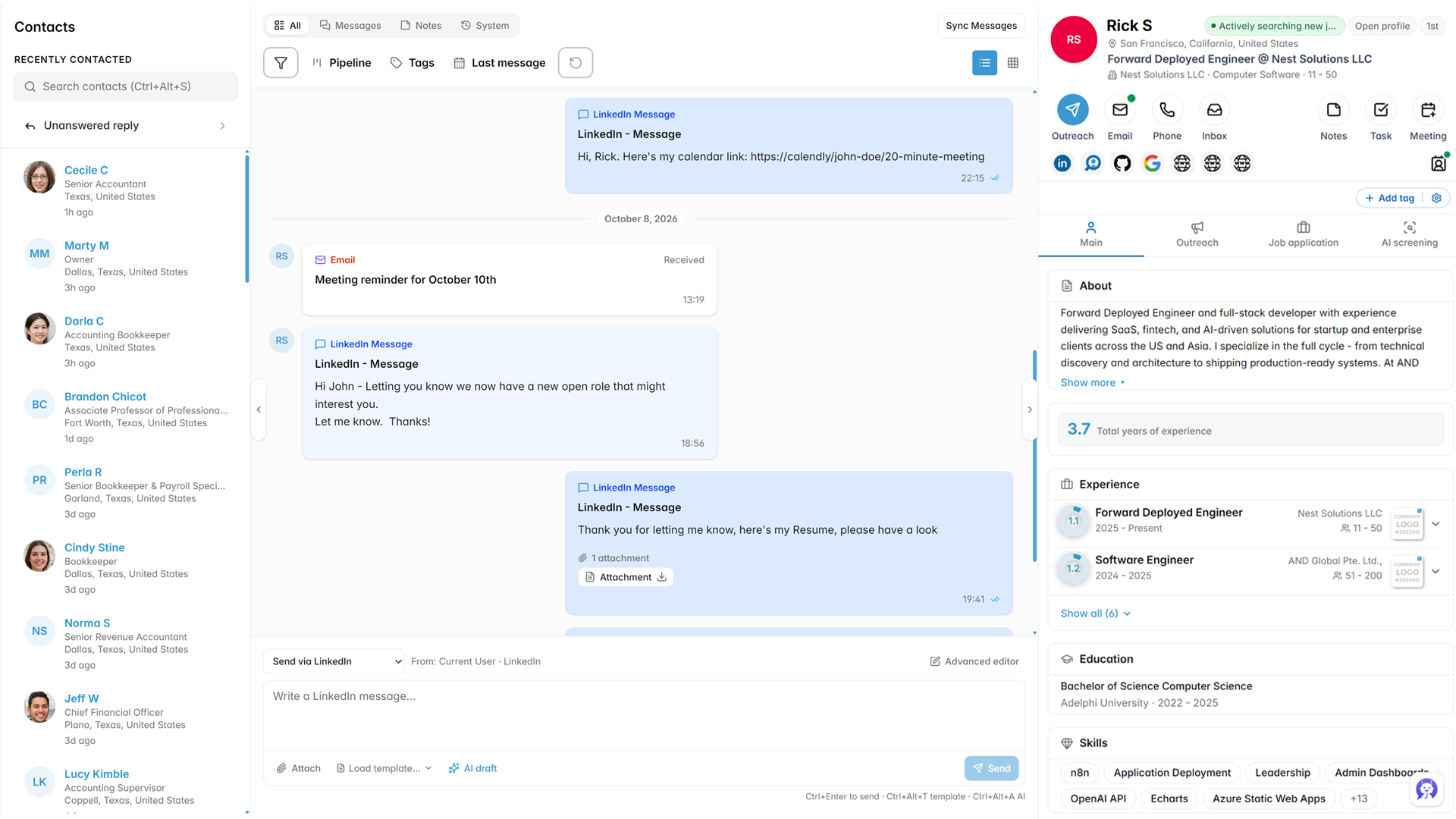
  • LinkedIn Messaging plus Email screenshot

    LinkedIn Messaging plus Email

    • Manage LinkedIn connection requests
    • Send and receive LinkedIn messages and InMails
    • Smart inbox for every channel
    • Multiple accounts, including sending on behalf of others
    See how it works (LinkedIn Messaging plus Email)
  • Outreach Campaigns screenshot

    Outreach Campaigns

    • Messaging campaigns at scale
    • Full automation with smart throttling
    • Missing emails found automatically
    • Personal or business sending, to keep things confidential

    AI personalizes every message

    See how it works (Outreach Campaigns)
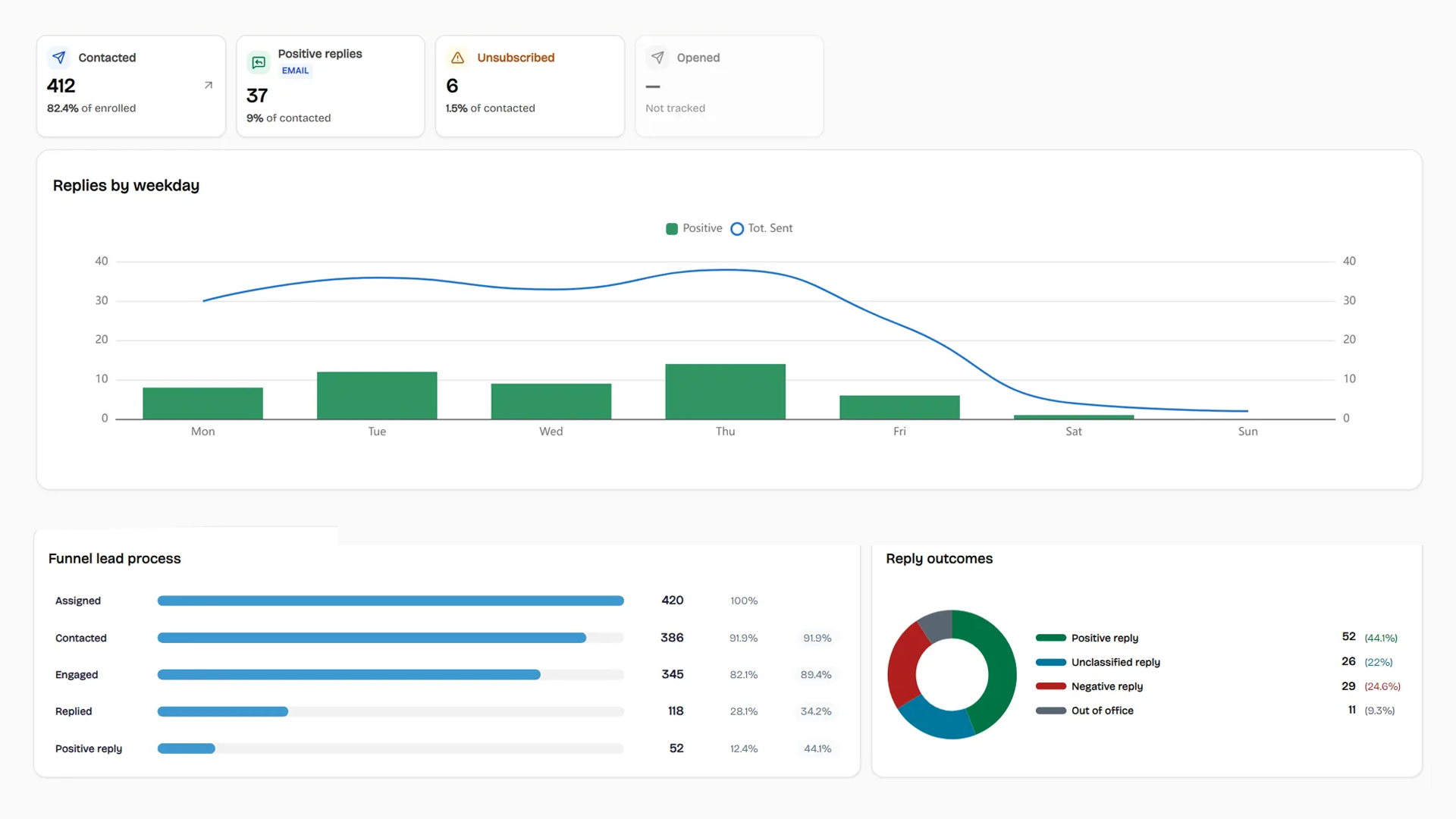
  • Automation, Monitoring and Reporting screenshot

    Automation, Monitoring and Reporting

    • "Set and forget" automation
    • Two-way sync with LinkedIn
    • Multi-account and throttle management
    • Replies trigger actions and move pipeline stages

    AI recognizes replies, drafts answers and tags contacts

    See how it works (Automation, Monitoring and Reporting)

Multi-channel Outreach Campaigns

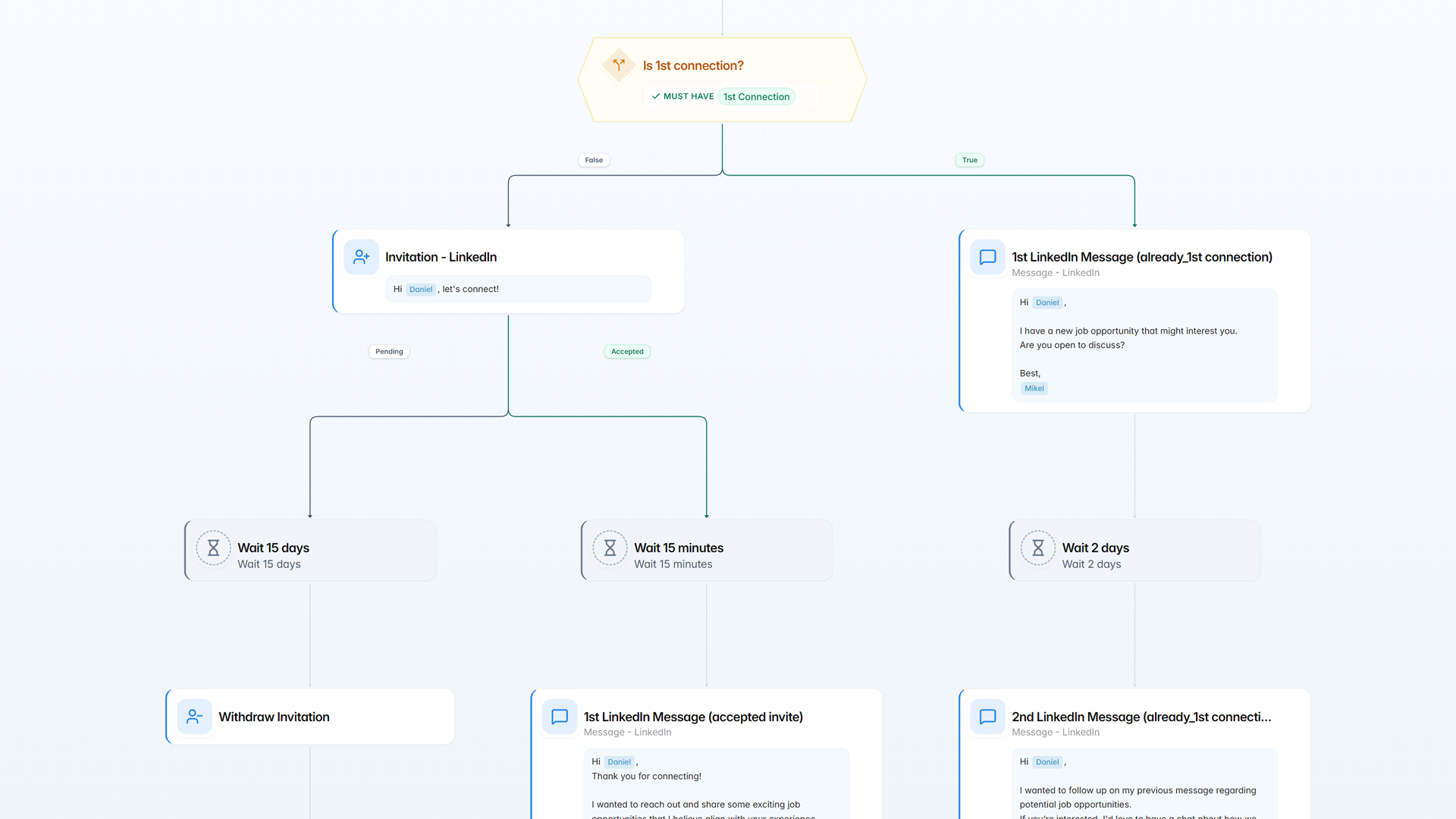
Custom-build your very own drip sequence combining both LinkedIn and email outreach

Engage with prospects, simultaneously, and automatically

  • Increase reach and diversify communication: People have different communication preferences, by combining both email and LinkedIn you can reach wider audiences and increase chances of connecting with potential prospects.
  • Personalization: Thanks to Jobin.cloud's adaptive sequence condition operations, you can personalize your outreach efforts even further. For example, you can mention sending a LinkedIn connection request in your email or mention specific actions you've taken earlier within the drip sequence.


Every action is automatically recorded in a practical interactions timeline for each profile.
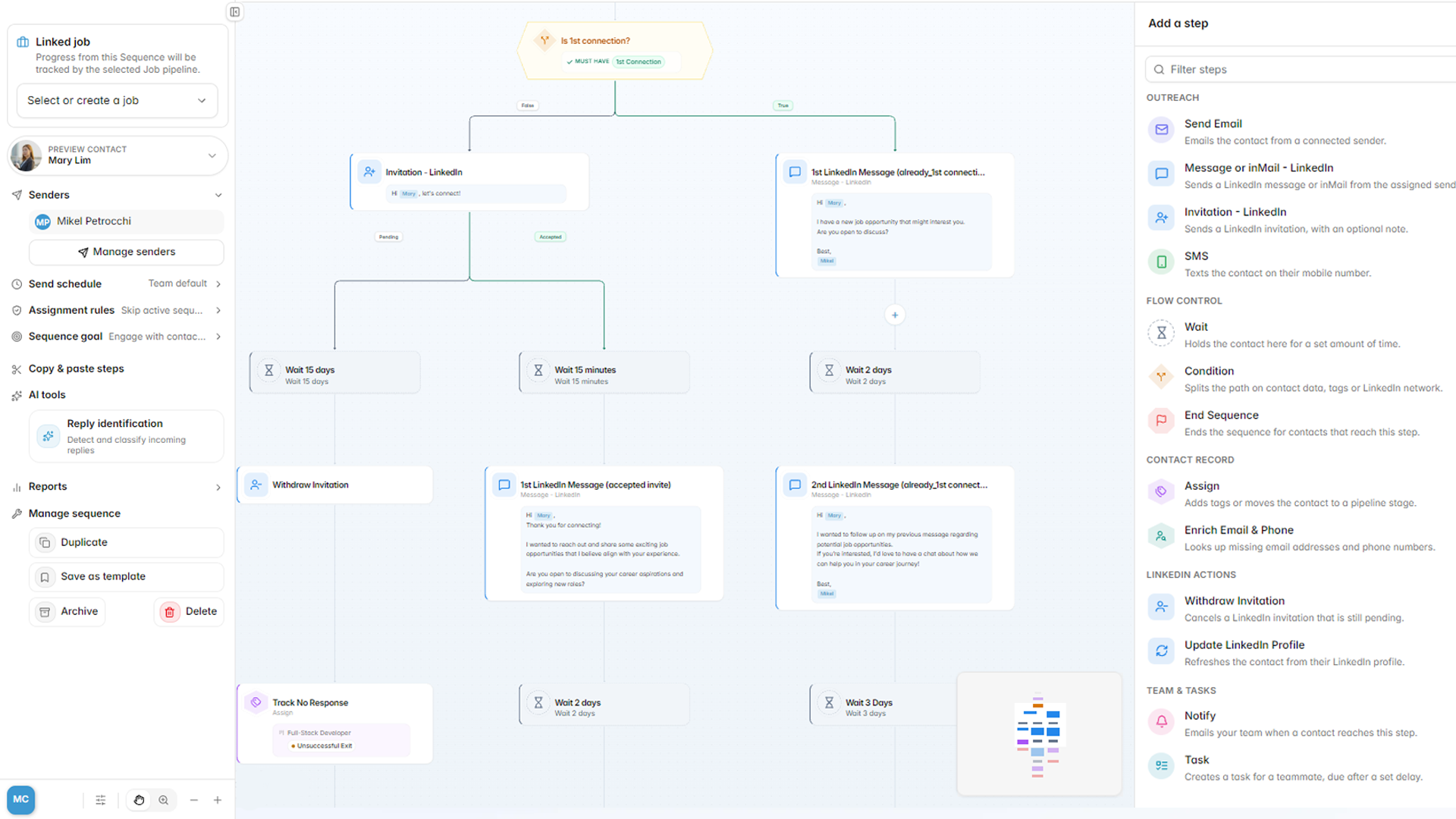

Actions the multi-channel Outreach sequence can perform, include but aren't limited to:

  • LinkedIn connection requests
  • LinkedIn direct messages
  • LinkedIn inMails
  • Emails
  • SMS
  • Wait timers
  • LinkedIn invitation withdrawal
  • LinkedIn profile auto-update
  • Assign operations (assign tags and stages)
  • Condition logic-gate (built-in filter)
  • Tasks/Reminders
  • Enrich Email & Phone
Multi-channel Outreach Campaigns

Sequences that fill your job pipeline

Stage automations move candidates as your outreach performs

Link a sequence to a job and its pipeline keeps itself up to date: everyone the sequence assigns, contacts, and hears back from is placed in the job's stages, with no cards to drag by hand.
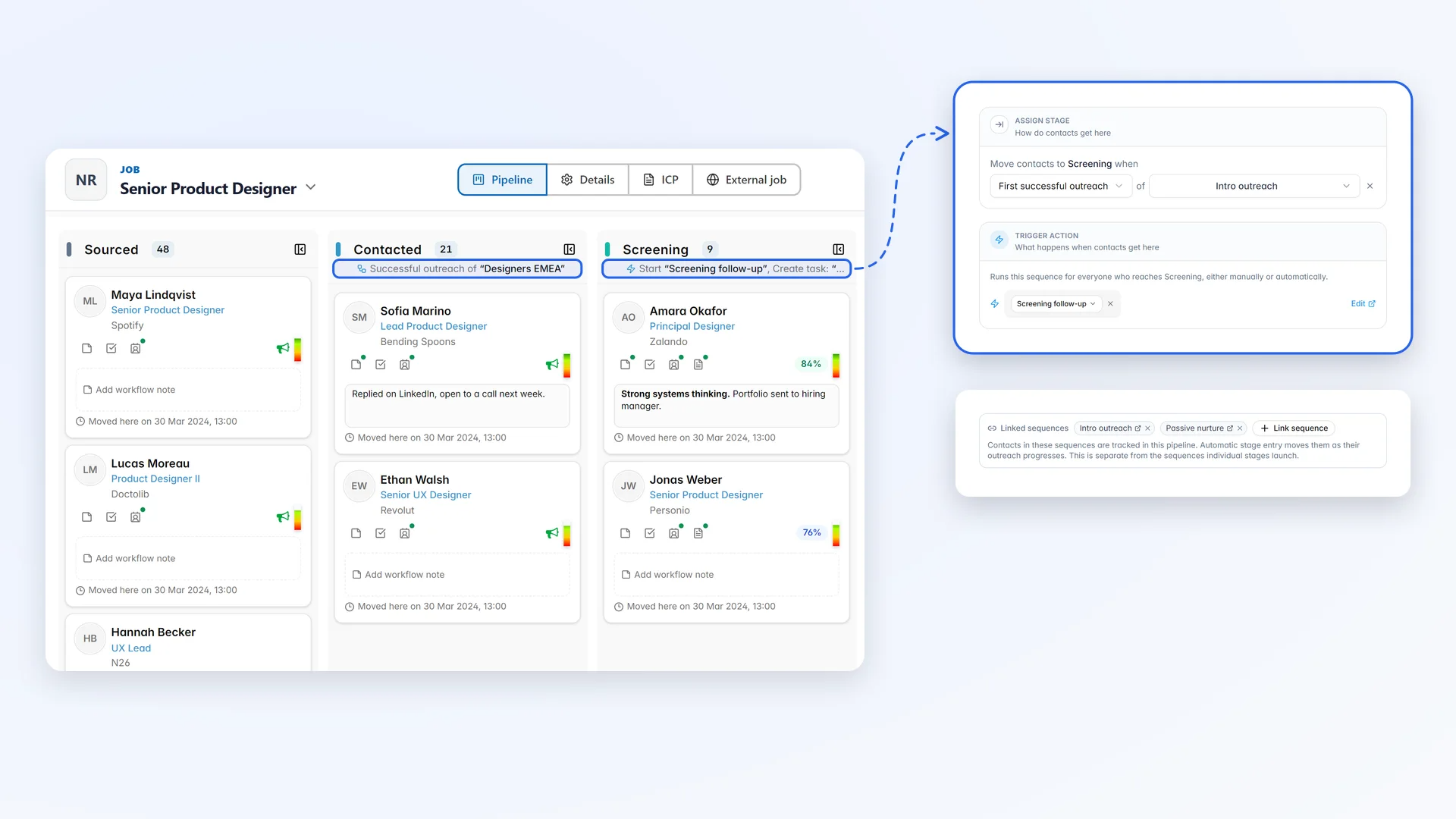
  • Move candidates automatically: give a stage an automation that fires on Contact assigned to sequence, First successful outreach, First human reply, or Interested. Candidates only ever move forward.
  • Launch the next sequence on stage entry: when a candidate reaches a stage, by automation or by hand, Jobin starts the follow-up sequence you chose for it.
  • Route replies by intent: AI reply identification can tag a contact, move them to a stage, or add them to another sequence.


Because the pipeline knows who has been assigned, contacted, and has replied, it also shows who hasn't been reached yet, so nobody is messaged twice for the same job. Save the stages and their automations as a pipeline template to reuse them on every new job.

Sequences that fill your job pipeline

Grow your LinkedIn network on autopilot

Send personalized bulk messages and unlimited connection invitations

Next to email, SMS, and calls, also grow your LinkedIn network, automatically and in bulk, with:

  • Automated bulk personalized connection requests
  • Automated follow-up messages
  • Custom messaging templates
  • Smart fields that adapt to each profile

No more endless cut-paste-edit actions, Jobin automatically performs all the repetitive stuff.
Only fill out your messages once, or just save a template, and you're all done.
  • Bulk inMail with custom templates and smart fields
  • Bulk LinkedIn messaging with attachments
  • Bulk withdraw invitations
Grow your LinkedIn network on autopilot

Easily find everyone you can contact

Quickly filter profiles by contacting method

Having lots of contacts is nice, but if you can't easily contact them, then what's the point?


Easily find anyone's best point of contact, either with dedicated filters or fully automatically with Sequences! No micromanagement needed.

All filters can be both filterd for and excluded, ranging from:

  • Email
  • Mobile phone number
  • Landline phone number
  • Internet site
  • Social media
  • ...and more

LinkedIn filters in particular, can go very into detail, providing

  • All connection-level filters (to find 1st connections)
  • Different LinkedIn subscriptions
  • Open profiles (to make use of all the free inMails)

The email channel of your outreach

Send personalized bulk emails

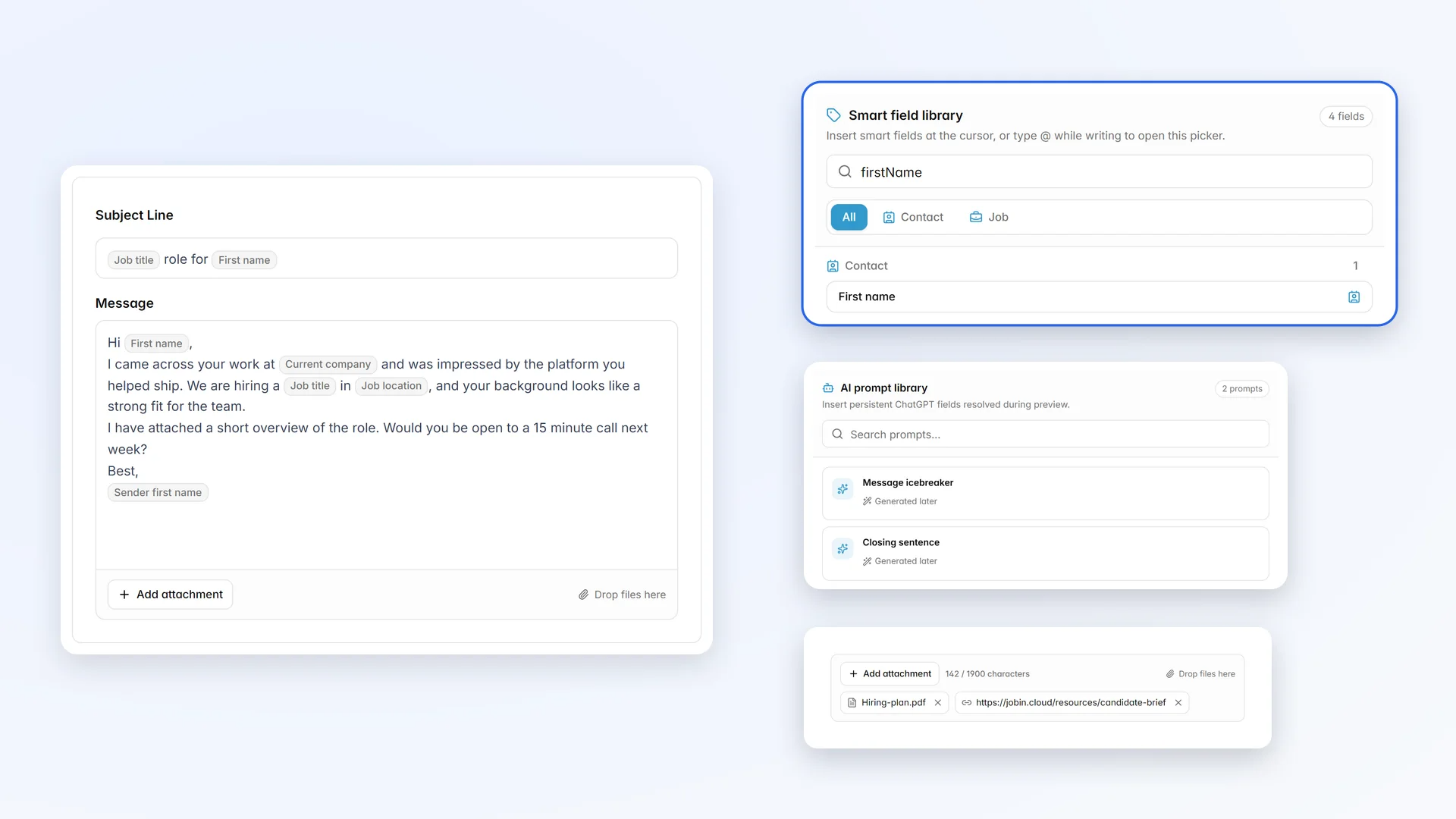
Aggregate, rank, filter and message all your Contacts with custom messaging templates while making use of smart fields, so that any message can sound fully personalized, even when sent to hundreds of people in bulk.

No more endless cut-paste-edit actions, Jobin performs all the repetitive stuff automatically, allowing you to finally focus, only on the contents and details of your messaging campaigns, without needing to repeat it for each individual recipient.

  • Custom email and messaging templates
  • Sender, recipient and job-spec Smart fields
  • Attachments for job-specs, videos, images, and more

All this together with a multitude of auxiliary features such as
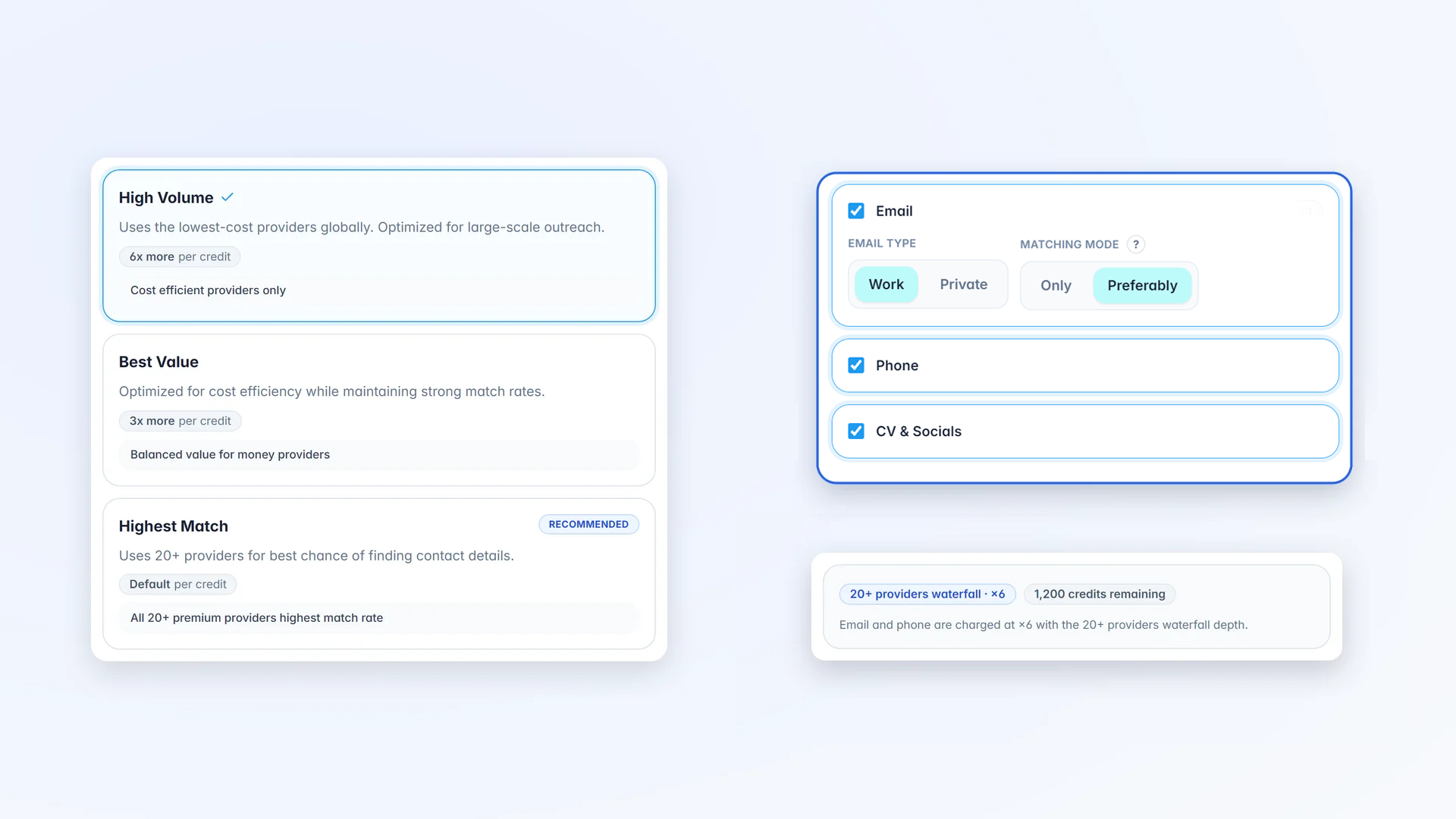
  • Auto enrich contacts with a missing email address (find email addresses and other contact details)
  • Timeline that registers every message/email sent to a profile
  • Missing/non-ideal email notice
  • Custom input fields assignable with [ ] (square brackets)
  • Automatically exclude and redirect emails with missing smart fields back to you, effectively preventing bad first impressions
The email channel of your outreach

Omnidirectional automated outreach

Reach out to anyone

Being capable of reaching out to contacts is the cornerstone of every workflow. In combination with filters to both find and enrich the most relevant contacts, outreach has never been easier.

  • Not a LinkedIn 1st connection? No problem

Regardless of connection level, reach out to anyone on LinkedIn.

Jobin.cloud offers automated connection requests, each with personalizable attachable notes, so not only can you quickly grow your network, but you can also have a direct line of communication with them.

  • No Email? No problem

Regardless of automatically having the email address extracted from LinkedIn or not, it won't impede your campaigns.

Jobin.cloud comes with an integrated email finder that can automatically fill in the gaps for anyone that's missing an email address, directly when sending the email campaign itself, so the automated contact detail enrichment is completely seamless.
Omnidirectional automated outreach

AI Sequence builder and smart sequences

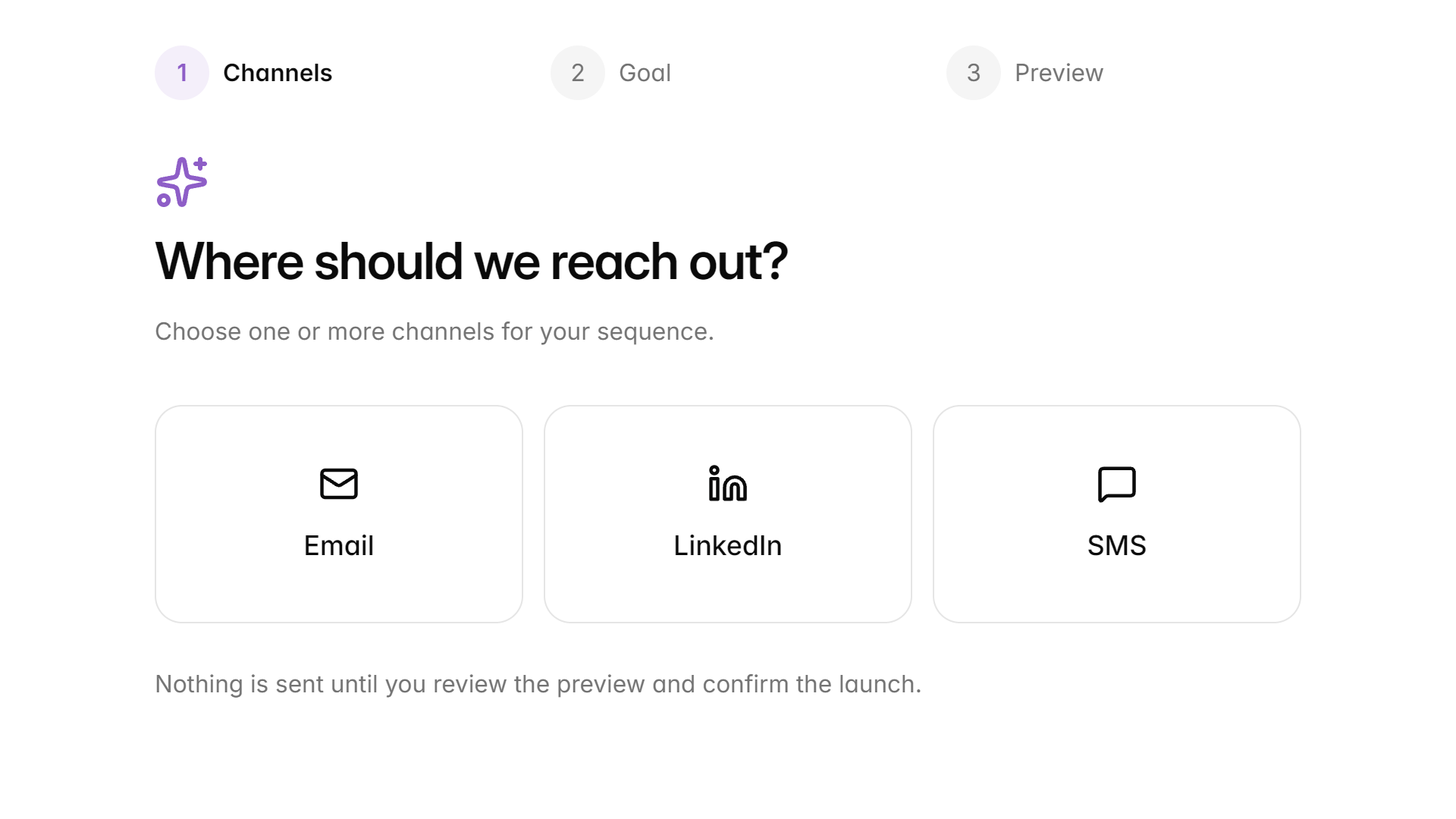
Describe your goal and let AI draft the whole sequence

Tell Jobin what you want to achieve, such as booking intro calls with senior engineers, and AI creates the sequence steps and messages for you to review.
  • Conditions that branch on what each contact did
  • AI reply intent recognition that moves contacts to the right stage or next sequence
  • Enrichment steps that find exactly the contact details a step needs
  • Manual task steps for calls and personal touches
  • Scheduled start times, and edits that reach contacts already in the sequence
  • Pause a sequence and every scheduled step stops at once; resume it and contacts carry on where they were
AI Sequence builder and smart sequences

SMS outreach

Text candidates from a dedicated virtual number

Add a virtual phone number to Jobin and include SMS steps in your sequences, alongside email and LinkedIn.
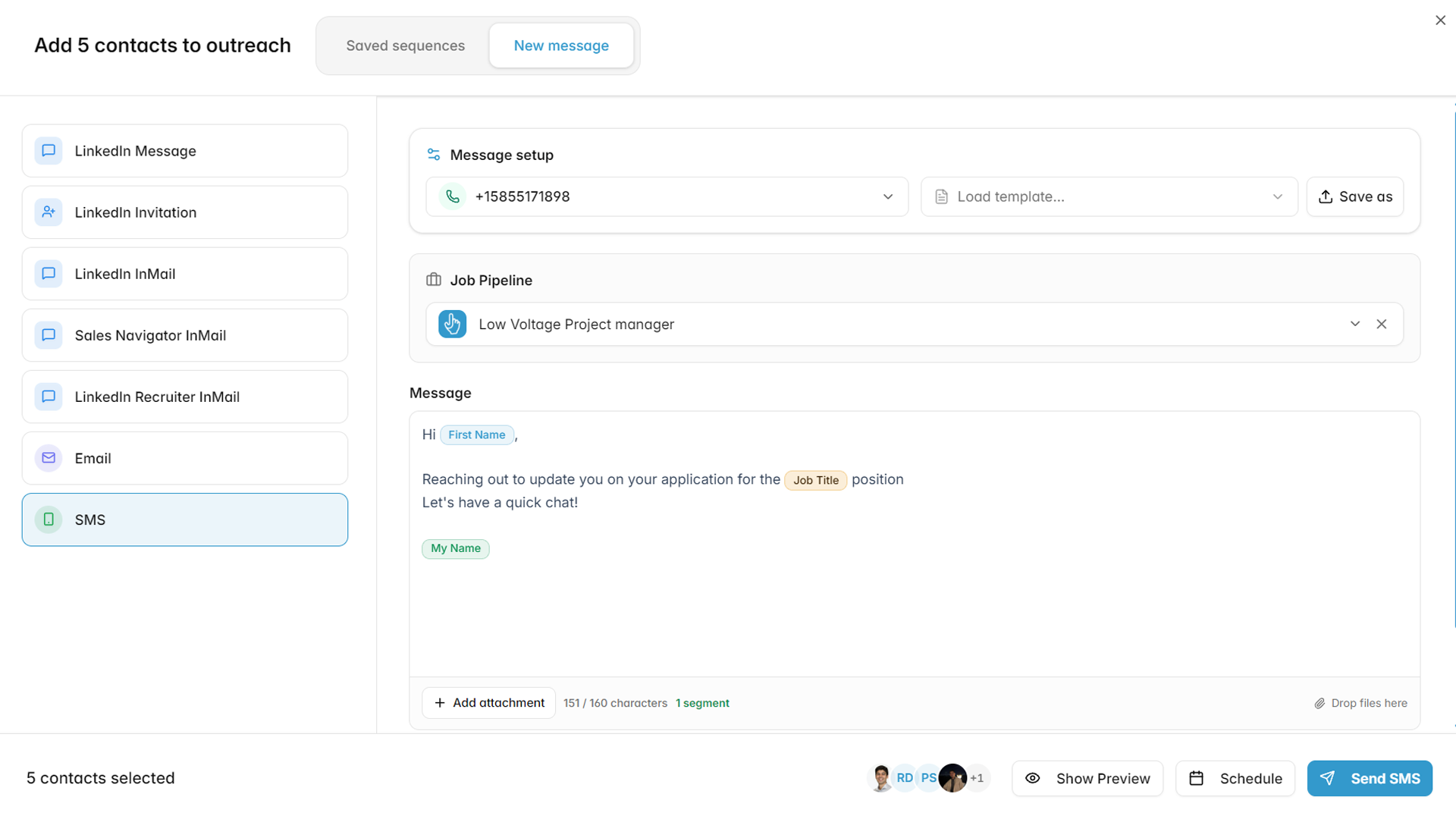
  • Mobile and toll-free numbers, with SMS and voice capabilities shown for each
  • Guided US A2P 10DLC registration with The Campaign Registry
  • SMS replies arrive in the unified inbox
SMS outreach

Dial-in calls with Jobin Voice

Call, record, and summarize every conversation

Call candidates and clients straight from their profile or a call task, and let Jobin write up the conversation for you.
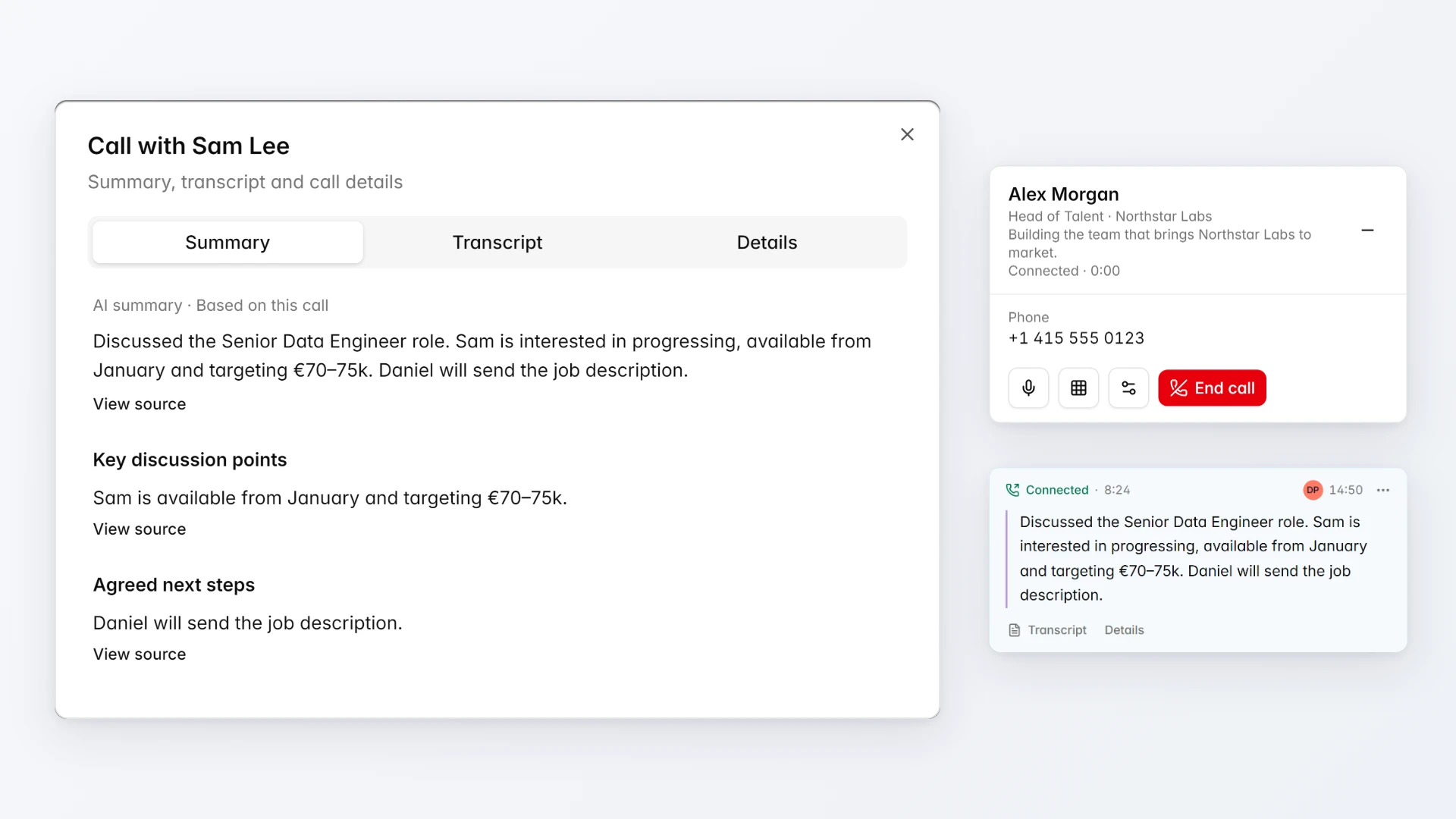
  • Call from the browser, or have Jobin ring your own phone first while the contact sees your business number
  • Answer inbound calls on your business number, with a notification in Jobin and a custom away message
  • Every call recorded and transcribed, with an AI summary, key discussion points, and agreed next steps on the timeline
  • Record the outcome, schedule a callback, and auto-call the next contact in your call queue
  • Already on Aircall? Connect it and call with your existing Aircall lines


Admins assign, reassign, and share business phone numbers across teammates and workgroups, so every recruiter has a line without losing central control. Calls stay linked to the contact, job, or deal they were about.

Dial-in calls with Jobin Voice

Unified inbox

Every email, LinkedIn message, and SMS in one conversation view

Answer candidates with their recruiting context beside the conversation: pipeline stage, notes, tags, and full activity timeline.

  • Replies labelled by intent, such as positive, not interested, or question
  • AI-drafted replies based on the conversation, with your own direction
  • Filter by pipeline, stage, tag, replies only, or date
  • CC and BCC on one-off emails, attachments, and drafts that are never lost
  • Share inbox access with teammates for each sender
  • Separate candidate and client conversations
  • Automatically unsubscribe contacts who reply STOP or unsubscribe, by email or SMS
Unified inbox

Operations monitor and safe sending limits

See, fix, and prioritize every queued action

Every message, invitation, and import Jobin performs is visible in the Operations monitor, so nothing fails silently.

  • Retry or archive failed operations in bulk, with the reason for each failure
  • Prioritize large operations so urgent outreach keeps moving
  • Skip a sequence step for selected contacts, or edit pending messages in bulk
  • Daily limits per account and operation type, operating hours, and human-like pacing
Operations monitor and safe sending limits

Sequence analytics

From delivery to booked meetings, step by step

Measure every sequence across channels and open the contacts behind each number.

  • Delivery, bounces, opens, clicks, and replies by step and channel
  • Positive and not-interested replies, and booked meetings
  • Recipient-level email delivery outcomes
  • Flexible date ranges and an outreach dashboard with response rates against the industry average
Sequence analytics

Proof points

  • LinkedIn and email in one sequence

    Recruiters can combine LinkedIn connection requests, LinkedIn messages, InMail, and email in one campaign workflow.

  • Personalization at scale

    Smart fields and AI-supported message personalization help teams write more relevant outreach without manual copy-paste work.

  • Pipeline-aware follow-up

    Outreach actions can connect to pipeline stages, tags, interaction timelines, and response handling.

Outreach pricing

Multi-channel outreach pricing is available as a focused module, with main platform pricing for teams that need more modules.

View pricing

Positioning

Compared with email-only campaign tools

Jobin.cloud brings LinkedIn messaging, email, enrichment, and recruiting context into the same outreach workflow.

Compared with standalone LinkedIn automation

Outreach connects to profiles, pipelines, smart inbox context, and CRM/ATS-style tracking.

FAQs

Can Jobin.cloud run multi-channel outreach?

Yes. Jobin.cloud supports outreach workflows that combine email and LinkedIn actions in campaign sequences.

Does outreach use AI personalization?

Yes. Outreach campaigns can use AI-supported personalization together with profile data and smart fields, and new sequences can be created with AI from a simple goal.

Can Jobin.cloud send SMS?

Yes. Jobin.cloud supports virtual phone numbers and SMS steps in sequences, with US A2P 10DLC registration, and SMS replies appear in the unified inbox.

Can recruiters call candidates from Jobin.cloud?

Yes. Jobin Voice calls candidates and clients from the browser or the recruiter’s own phone using a business number, answers inbound calls, records and transcribes each call, and adds an AI summary with key points and agreed next steps to the contact timeline. Teams that use Aircall can connect it and call with their existing lines.

Browse the full product FAQ
Jobin.cloud

contact record

AI Sourcing

Email/Phone Finder

AI Screening

Multi Outreach

Unified Inbox

Pipeline

Ready to experience it firsthand?

Less busywork.More results.

Bring sourcing, outreach and contact management together in Jobin.

Free to start, live in minutes.