Jobin.cloud Feature

Sourcing

Enjoy the most complete set of tools to find People for your Business.
Find clients, find candidates, find business partners.

Key Features
Find Clients and Candidates
ChatGPT integrated with Jobin.cloud
Supported by AI
All you need to find relevant People for your Business.
Build you network of business contacts, have their full profiles, nurture and close deals.
People Finder screenshot
People Finder iconPeople Finder
Check mark
2.5+ Billion aggregated Profiles available.
Check mark
Advanced searching systems.
Check mark
AI-supported filtering and matching.
Check mark
Get Email, Phones and Social URLs as well.
Try now
Arrow pointing up and right
Source from LinkedIn screenshot
Source from LinkedIn iconSource from LinkedIn
Check mark
Unlimited LinkedIn profiles import.
Check mark
Import LinkedIn Groups Members and events attendees.
Check mark
Import people interacting with posts.
Check mark
Works with LinkedIn Free, SalesNav, Recruiter.
Try now
Arrow pointing up and right
Source from the whole Internet screenshot
Source from the whole Internet iconSource from the whole Internet
Check mark
Import from several social media
Check mark
X-Ray searches on Google and Bing
Check mark
Boolean strings builder
Check mark
Bulk .CSV and CV/Resume Import
Try now
Arrow pointing up and right
AI Search icon

AI Search

2.5+ Billion aggregated Profiles

Have AI scan and reaserch through a massive aggregated repository of profiles from a multitude of available internet sources all around the world.

Simply describe what you're looking for or paste in a Job description and the AI's research does the rest - you can then fine-tune manually as well.

  • No geographical or industry limitations.
  • Each found result is updated in real-time to ensure you have the latest data.
  • The AI's research will also generate more advanced criterion-based searches as opposed to the more limited keyword-based searches, allowing you to keep searches both very borad and very targeted at the same time!

Once imported, results will also often include contact details like emails and phone numbers, allowing you to easily get in touch,as well as their social profile URLs, making it easy to connect with prospects on social media.

You can also have AI screen and write a report about the results it finds so that you don't need to manually look through them to find more nuanced requirements that finlters normally miss out on.

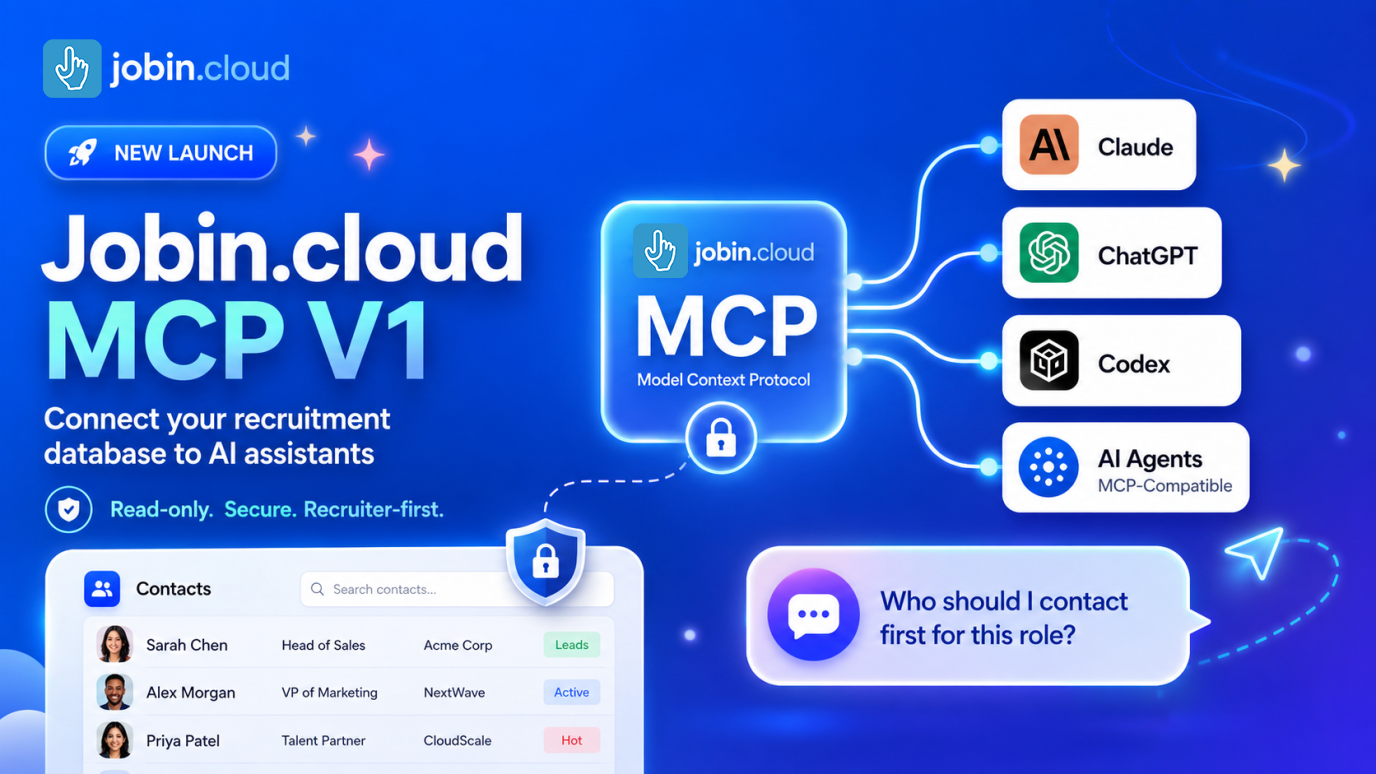
Jobin.cloud MCP for AI Assistants icon

Jobin.cloud MCP for AI Assistants

Connect sourcing context to Claude, ChatGPT, Codex, and AI agents

Jobin.cloud MCP gives AI assistants secure access to the recruiting context they need to support sourcing decisions.


Instead of copying candidate data, notes, tags, outreach history, and pipeline activity into a chat manually, recruiters can connect an MCP-compatible assistant to Jobin.cloud and ask sourcing questions with workspace context available.

  • Search contacts and profiles from AI assistants that support MCP
  • Review candidate notes, tags, timelines, and sourcing context
  • Prepare better shortlists and outreach with less copy-paste work
  • Use read-oriented context access before taking action in recruiting workflows


Read more about Jobin.cloud MCP for AI Assistants.

Jobin.cloud MCP for AI Assistants
Automated LinkedIn profile import icon

Automated LinkedIn profile import

Source candidates and leads in one click

Simplify prospecting efforts by automating LinkedIn profile-searches and imports.

Finding and actively engaging with the right people is the first essential step of any business. However, browsing on social networks tends to be long and frustrating without the support of proper automation.


With the Jobin Extension, any Contact can be instantly imported in full with:

  • All Contact Details
  • All Summaries, Skills and Accomplishments
  • All Professional and Educational Experiences
  • LinkedIn subscription, connections and connection level

and much more

Unlimited bulk import in autopilot icon

Unlimited bulk import in autopilot

Surpass the limits of what a regular user can do

Import in FULL (not just Name and Role) hundreds if not thousands of potential leads, in just one click, be it people, or companies.

Remain untracked by LinkedIn, and surpass the limits of what regular users can do.


You can bulk import full profiles, in multiple ways all in 1-click:

  • Auto-import all your 1st connections
  • Import all 100 pages from any search results
  • Import Group members
  • Import Event attendees
  • Import Post participants
  • Import Newsletter Subscribers

All extracted profiles will be added to a job-spec pipeline

of your choosing, and before being transferred into your Jobin repository, can also be assigned tags and notes to easily create talent pools.
Seamlessly Import without clicking icon

Seamlessly Import without clicking

Import just by viewing!

  • Do you spend a lot of time browsing on LinkedIn?
  • Is manually clicking import too much of a hassle?


Say no more!
After enabling Auto Import, just viewing a profile is enough to fully import them into your Jobin repository.


The import is instant, no need to worry about browsing too fast


Viewed a profile multiple times? Not a problem
Everything gets seamlessly merged, so instead of ending up with duplicates, you've fully updated them instead!

Email finder and Profile Enrichment icon

Email finder and Profile Enrichment

Find emails and enrich profiles in one-click

LinkedIn profiles are definitely rich with useful information, but not always do they have everything; more often than not, emails, phone numbers, and other social media profiles are kept private or not mentioned.


Reach over 900M contact details with the press of a button:

  • Business and private email addresses
  • Landline and mobile phone numbers
  • Other social media profile urls


No need to monotonously click to scan for the contact details either:

  • Enrich contacts in bulk in just one click
  • Auto enrich contacts in your email campaign
Data is kept healthy icon

Data is kept healthy

AI data management

Recruiting databases quickly become obsolete without frequent maintenance and cleaning, but nobody has the time to do this properly.


Massive data is useless if not well structured, filterable, rankable and cleaned from duplication or redundancies.


Data scattered among different platforms and formats that cannot be aggregated, standardized and transferred, do not provide easy accessible information either.


Let Jobin.cloud do all that heavy lifting for you!


Database cleaning and de-duplication is all handled automatically, if contradictory data is found Jobin will let you decide what to keep and what to discard.

Auto-compiled Google and Bing X-Ray search icon

Auto-compiled Google and Bing X-Ray search

Find anyone throughout the web in one click

No need to memorize any complicated search string formatting, Jobin does it all automatically for you!

  • Required fields
  • Excluded fields
  • Locations
  • Which website

and an extra search string for all the boolean string geeks to freely tweak.

All of this automatically formatted into a Google or Bing X-Ray so that you can quickly find anyone, anywhere.

Jobin's X-Ray searches are also fully integrated with our filters.
Didn't find the right people in your database?
All active filters get automatically compiled into the X-Ray search of your choosing, so you don't even have to type anything!

Data migration made simple icon

Data migration made simple

The weak point of all ATS!

Nobody speaks about it because it's hard, painful and also expensive, but any Recruiter needs to migrate profiles and data, from their old and obsolete systems, into their new smart ATS.


In addition to that, nowadays, we have more and more data sources, and many Recruiters will need a system to easily aggregate all that precious information scattered among tens of different accounts, software tools and internet services, into one single, clean and easy to maintain repository.


All this revolves around data transfer and aggregation, the so-called, by data warehousing specialists, ETL (Extract, Transform, Load) process.


Jobin is outstanding in this! Any dataset in the common .csv format can be instantly adapted and imported into your centralised Jobin repository.

  • Data association
  • Data merging
  • Data de-duplication
  • Data cleaning


All under control with a few clicks thanks to a lot of background automatic processing that Jobin does for you.
Furthermore, benefit from Jobin's machine learning, which will recognize your previously used .csv data structure and pre-compile it for you, or at the very least, save your data association structure so that you'll only ever need to do it once.


In conclusion, what once was a hard, tedious and time consuming task that could exclusively be done by expensive, outsourced expert data engineers, is now easily manageable by yourself!

Easily find everyone you can contact icon

Easily find everyone you can contact

Quickly filter profiles by contacting method

Having lots of contacts is nice, but if you can't easily contact them, then what's the point?

Jobin is well aware of its importance, that's exactly why we've built a dedicated filter, for just that.

All filters have their own exclude counterpart, ranging from:

  • Email
  • Mobile phone number
  • Landline phone number
  • Internet site
  • Social media


LinkedIn filters in particular, can go very into detail, providing:

  • All connection-level filters (to find 1st connections)
  • Different LinkedIn subscriptions
  • Open profiles (to make use of all the free inMails)
Automated people outreach on LinkedIn icon

Automated people outreach on LinkedIn

Send personalized bulk messages and connection invitations

Engage with the right people, simultaneously, and automatically, with:

  • Automated bulk personalized connection requests
  • Automated follow-up messages
  • Custom messaging templates
  • Smart fields that adapt to each profile

No more endless cut-paste-edit actions, Jobin automatically performs all the repetitive stuff.
Only fill out your messages once, or just save a template, and you're all done.

  • Bulk inMail with custom templates and smart fields
  • Bulk emailing and messaging with attachments
  • Bulk withdraw invitations

Furthermore, everything is recorded in a practical interactions timeline for each profile.

Proof points

  • 2.5+ billion aggregated profiles

    People Finder gives recruiters and prospecting teams a broad profile source for candidate and client discovery.

  • Contact data in the same workflow

    Sourced profiles can include emails, phone numbers, and social URLs when available.

  • AI-supported review

    Jobin.cloud can help screen and report on sourced profiles so teams spend less time manually sorting results.

Sourcing pricing

AI sourcing and screening pricing is available as a focused module, with broader options on the main pricing page.

View pricing

Positioning

Compared with manual LinkedIn browsing

Jobin.cloud combines import automation, enrichment, filtering, and structured profile storage in one workflow.

Compared with standalone contact tools

Sourcing, enrichment, outreach, and CRM/ATS context can stay connected instead of split across disconnected tools.

FAQs

Can Jobin.cloud source candidates and clients?

Yes. The sourcing page covers workflows for finding candidates, clients, business partners, and other relevant people.

Does sourcing include contact enrichment?

Yes. The sourcing workflow includes contact discovery and enrichment features for emails, phone numbers, and social URLs when available.

All-in-One AI Platform

Ready to experience it firsthand?

Start free — be live in minutes

Book a live demoArrow icon