AI candidate search helps recruiters find and rank people against requirements that are difficult to express with traditional keyword or Boolean filters. Jobin.cloud now combines a faster AI Search with on-demand AI Screening, so teams can evaluate both newly discovered candidates and contacts already stored in their recruitment database.
Recruiters can describe criteria in natural language, review the evidence behind each assessment, compare match scores, and return to saved screening results later. The goal is to reduce repetitive profile review while keeping hiring decisions and final validation with the recruiter.
Watch the complete AI Search and AI Screening walkthrough:
What are AI candidate search and on-demand AI screening?
AI candidate search interprets a recruiter's requirements, expands the search into relevant roles and criteria, analyzes profile information, and ranks candidates by fit. On-demand AI screening applies a custom evaluation framework to a selected list of contacts, including candidates already saved in Jobin.cloud.
Together, the two workflows support both candidate discovery and candidate rediscovery. A recruiter can search the wider talent pool, add promising people to a job, or screen an existing database without rebuilding the list from scratch.
Key AI recruiting features covered in the video
- Natural-language AI candidate search
- Automatic expansion of job titles and search criteria
- Faster search-framework generation
- Custom evaluation criteria for nuanced requirements
- Evidence-based candidate assessments and match scores
- Live reranking with refreshed candidate information
- Bulk AI screening for selected contacts or entire lists
- Saved screening results that can be reopened with filters
How AI Search evaluates complex hiring requirements
Standard filters work well for explicit fields such as a job title, skill, employer, or number of years in a role. They become less reliable when the requirement depends on context. Leadership experience is a useful example: a title can suggest leadership, but it does not always prove that someone led an engineering team or served as a technical lead.
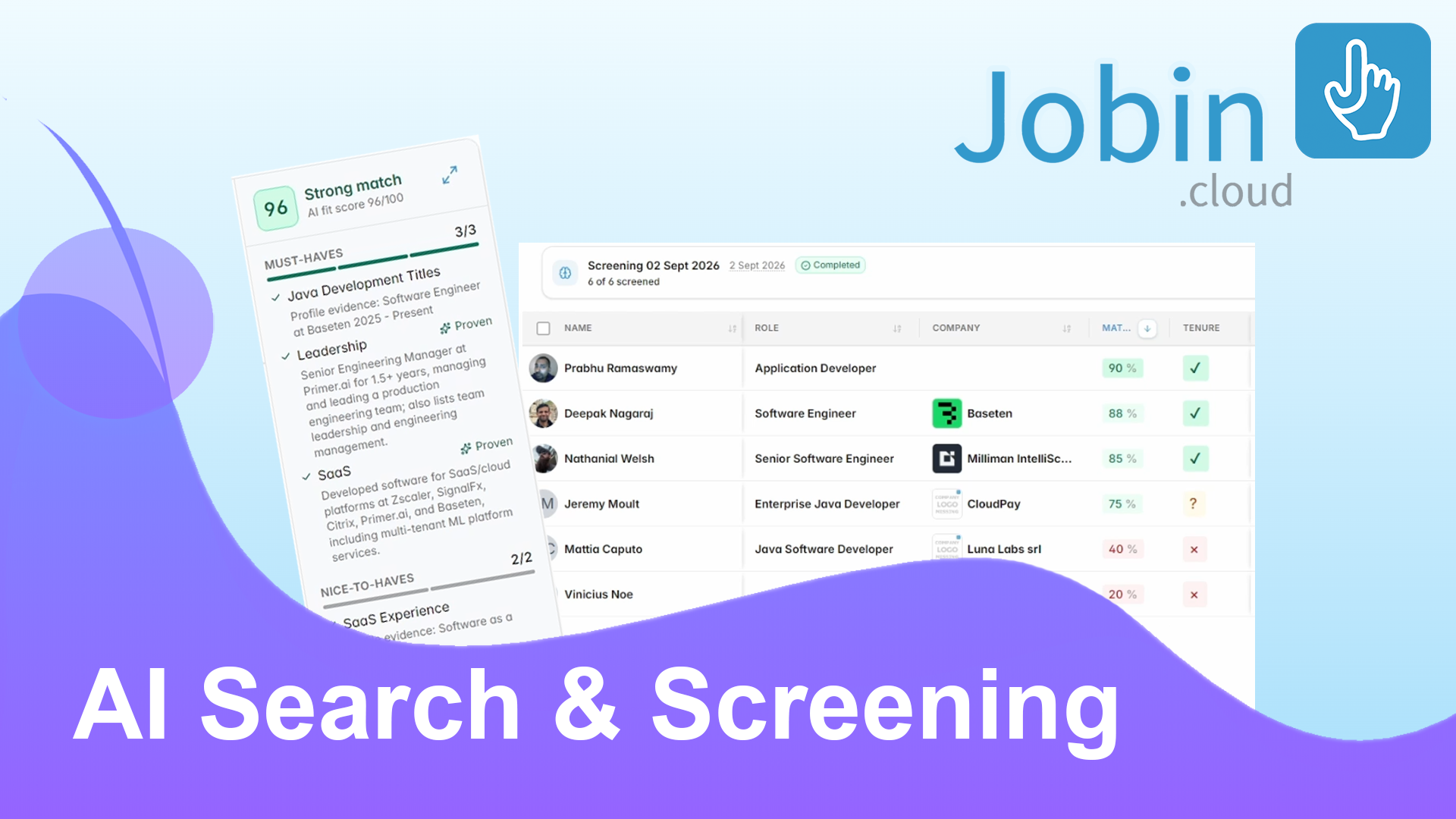
In the video, the search asks for a Java developer with SaaS experience and at least two years of professional leadership experience. Jobin.cloud expands relevant developer-title variations and creates dedicated evaluation criteria for Java, SaaS, and leadership rather than relying on a single keyword match.
The resulting candidate list is reranked as assessments complete. Each score is accompanied by a summary that identifies the profile evidence used for the evaluation, helping recruiters understand why one candidate appears above another.
What do Proven, Mentioned, Inferred, and Missing mean?
Jobin.cloud labels the strength of the available evidence for each screening criterion. These labels make an AI assessment easier to review:
- Proven: the profile contains concrete supporting evidence, such as a role, project, responsibility, or applied experience.
- Mentioned: the requirement is explicitly stated in the candidate's profile.
- Inferred: the available information reasonably suggests the requirement, although it is not directly stated.
- Missing: the profile does not provide enough evidence to confirm the requirement.
These statuses separate direct evidence from interpretation. A high score helps prioritize review, but it should not be treated as a hiring decision or a substitute for recruiter judgment.
Screen contacts already in your recruitment database
On-demand AI Screening is not limited to candidates returned by a new search. Recruiters can select contacts in a job pipeline or elsewhere in their Jobin.cloud database, describe what they want to evaluate, and run the same assessment across the selected list.
The walkthrough demonstrates this with a custom requirement: an average job tenure of at least two years. A simple request creates one criterion, while a fuller brief or job description can generate multiple screening criteria for a more detailed evaluation.
This workflow is useful for candidate rediscovery. Existing records can be screened against a newly opened role, a revised client brief, or an additional qualification without manually opening every profile.
Save, filter, and revisit AI screening results
Completed screenings remain accessible through Jobin.cloud filters. Recruiters can reopen a screening, start with the highest-ranked contacts, and continue reviewing the list in a later session.
Saved results also preserve the connection between evaluation and workflow. Teams can use the usual bulk actions after screening, compare the available evidence, open a full candidate profile when more context is needed, and move selected people through the recruitment process.
A practical AI screening workflow for recruiters
- Describe the role and must-have requirements in plain language.
- Review the AI-generated search filters and screening criteria.
- Run the search and compare ranked candidate assessments.
- Check whether important evidence is proven, mentioned, inferred, or missing.
- Add suitable candidates to a job or select an existing list.
- Run additional on-demand screening criteria when needed.
- Reopen saved screenings and validate the strongest candidates before outreach or shortlisting.
Where human review still matters
AI screening can summarize profile evidence and make large lists easier to prioritize. It cannot confirm information that is absent or inaccurate, and an inference is not the same as verified experience. Recruiters should review the underlying profile, apply role-specific judgment, and speak with the candidate before making consequential decisions.
Used this way, AI handles more of the repetitive reading and comparison while recruiters remain responsible for context, qualification, fairness, and the final decision.
Try AI candidate search and screening in Jobin.cloud
Jobin.cloud brings AI candidate discovery, evidence-based evaluation, database screening, and recruitment workflow tools into one platform. The new AI Search and on-demand AI Screening features are available to try during the free trial.
Related reading: AI Search Autopilot | Practical AI Sourcing Tips | Recruiting CRM Guide
FAQ
What is AI candidate search?
AI candidate search interprets hiring requirements in natural language, expands relevant roles and criteria, analyzes candidate profiles, and ranks results by fit. It can evaluate contextual requirements that are difficult to express with standard keyword or Boolean filters.
How is on-demand AI screening different from AI candidate search?
AI candidate search discovers and ranks talent, while on-demand AI screening evaluates a selected list against custom criteria. In Jobin.cloud, that list can include contacts already stored in the recruitment database.
Can recruiters use AI screening on existing candidates?
Yes. Recruiters can select existing Jobin.cloud contacts, describe the requirements they want to assess, and run screening across the chosen candidates in bulk. Saved screening results can be reopened later through database filters.
What do Proven, Mentioned, Inferred, and Missing mean in AI screening?
Proven indicates concrete supporting evidence, Mentioned means the requirement is explicitly stated, Inferred means the available information reasonably suggests it, and Missing means the profile does not contain enough evidence to confirm it.
Does AI candidate screening replace recruiter review?
No. AI screening helps summarize evidence and prioritize profiles, but recruiters should verify the underlying information, assess context and fairness, and speak with candidates before making consequential decisions.
Summary
Jobin.cloud combines faster natural-language AI candidate search with on-demand screening for existing contacts. Recruiters can generate nuanced criteria, compare match scores, review Proven, Mentioned, Inferred, or Missing evidence, screen lists in bulk, and revisit saved results. AI helps prioritize profile review, while recruiters retain responsibility for validation and hiring decisions.
- Primary topic
- AI candidate search
- Who this is for
- Recruiters, talent sourcers, staffing agencies, executive search teams, and talent acquisition professionals who need to evaluate new and existing candidates efficiently.
- Reader goal
- Understand how AI candidate search and on-demand candidate screening work in Jobin.cloud, including evidence statuses, match scoring, bulk screening, and saved results.
Sources
- AI Search and On-Demand AI Screening - Jobin.cloud
- Jobin.cloud AI Recruiting Platform - Jobin.cloud